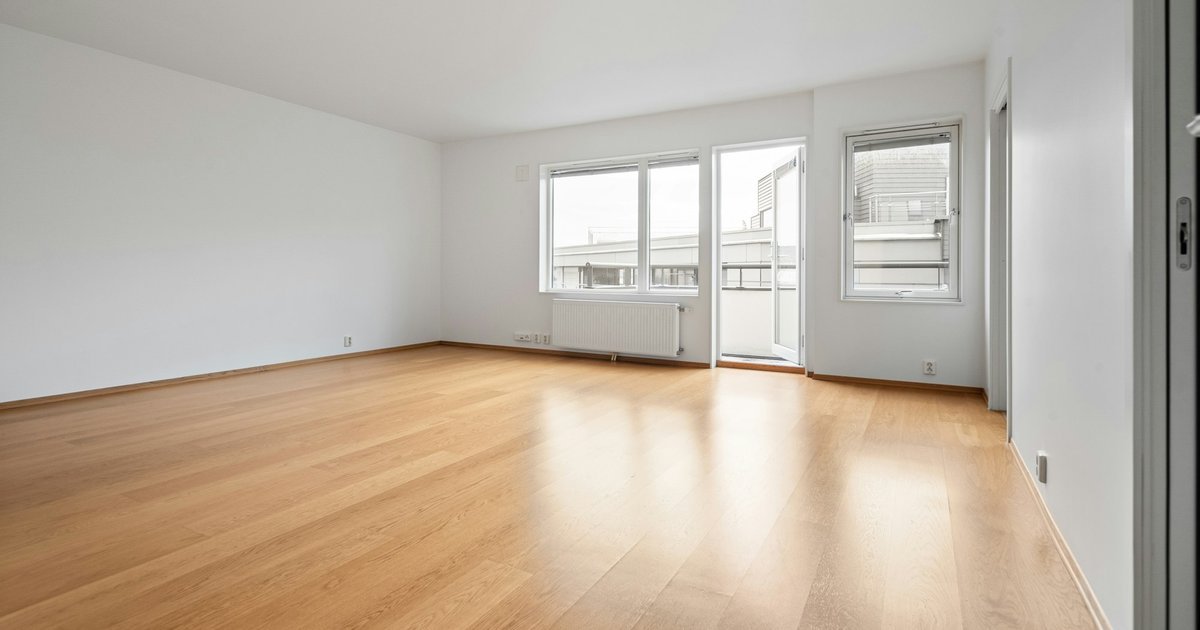
Space planning turns a brief into a room schedule, then tests areas, adjacencies, circulation and furniture within the floor area before anyone draws it up. Picture a two-bedroom flat on the desk: a one-page brief, the developer's shell drawing and a second bedroom that already looks too narrow.
That narrow bedroom is a question the layout has to settle before anyone dimensions a wall. This guide runs the tests in the order a studio meets them, with that flat for four people as the worked example. Each step ends with the question the plan must pass. All of it happens early in the schematic design phase, while walls still move freely.
Key takeaways
- Start from a room schedule with an occupancy and a target area for every room, including the hall and storage, then draw.
- The nationally described space standard for England gives 70 m² as the minimum for a one-storey, two-bedroom, four-person home. It applies where a local authority has adopted it.
- Rate every pair of rooms as essential, desirable or keep apart, then group the essentials into an entrance, a day zone and a night zone.
- The 2010 ADA Standards set a 915 mm minimum width for walking surfaces in facilities the ADA covers. Elsewhere, treat it as a benchmark and let your local code govern.
- Furnish every room and draw every door swing before the walls are fixed, because furniture decides whether an area works as a room.
Start with a room schedule, not a sketch
A room schedule turns the brief's prose into numbers you can test. List every room, who uses it and the area you are aiming for. Add the storage and the hall, because a brief rarely names them and a tight plan loses them first.
Set the targets from the brief and from comparable jobs. A target is a design intention, so it should sit above any published minimum. Keep the minimum in its own column, so the margin between the two stays visible as the plan changes.
The figures below are the example's targets for a mid-market brief. Only the minimum column carries published figures, from the space standard in the next section. The rooms add up to 69.5 m², and the internal walls and a working margin take the rest.
| Room | Occupancy | Example target | NDSS minimum |
|---|---|---|---|
| Whole flat, one storey | 4 people | 74 m² | 70 m² |
| Bedroom 1, double | 2 people | 13.5 m² | 11.5 m² and 2.75 m wide |
| Bedroom 2, double or twin | 2 people | 12.0 m² | 11.5 m² and 2.55 m wide |
| Living, kitchen and dining | 4 people | 30.5 m² | - |
| Bathroom | 4 people | 5.0 m² | - |
| Entrance hall | - | 6.0 m² | - |
| Built-in storage | - | 2.5 m² | 2.0 m² |
Write the relationships down at the same time, but keep them out of the area table. They feed the adjacency matrix further down. Hold the pencil until the schedule passes two tests. Every room in the brief has a target, and the targets fit the shell.
Check the schedule against a space standard
The government's nationally described space standard for England, published in March 2015, deals with internal space within new dwellings. The standard sets gross internal areas at a defined occupancy, plus floor areas and dimensions for bedrooms, storage and floor-to-ceiling height. Its bedspace classification is for assessment when seeking planning approval, if a local authority has adopted the standard in its Local Plan.
Homes are described by bedrooms and bedspaces, so the example flat is a 2b4p home. A double or twin bedroom provides two bedspaces and needs at least the area in the table. One double must also reach the wider of the two widths, and every other double the narrower one.
Drop the brief to three bedspaces and the second bedroom becomes a single. That room needs at least 7.5 m² and a width of at least 2.15 m. The standard also sets a minimum floor-to-ceiling height of 2.3 m for at least 75% of the gross internal area.
Measure your total the way the standard defines it: the floor space between the internal faces of the perimeter walls. A total taken to the outer face of the walls looks generous and will not compare with the table.
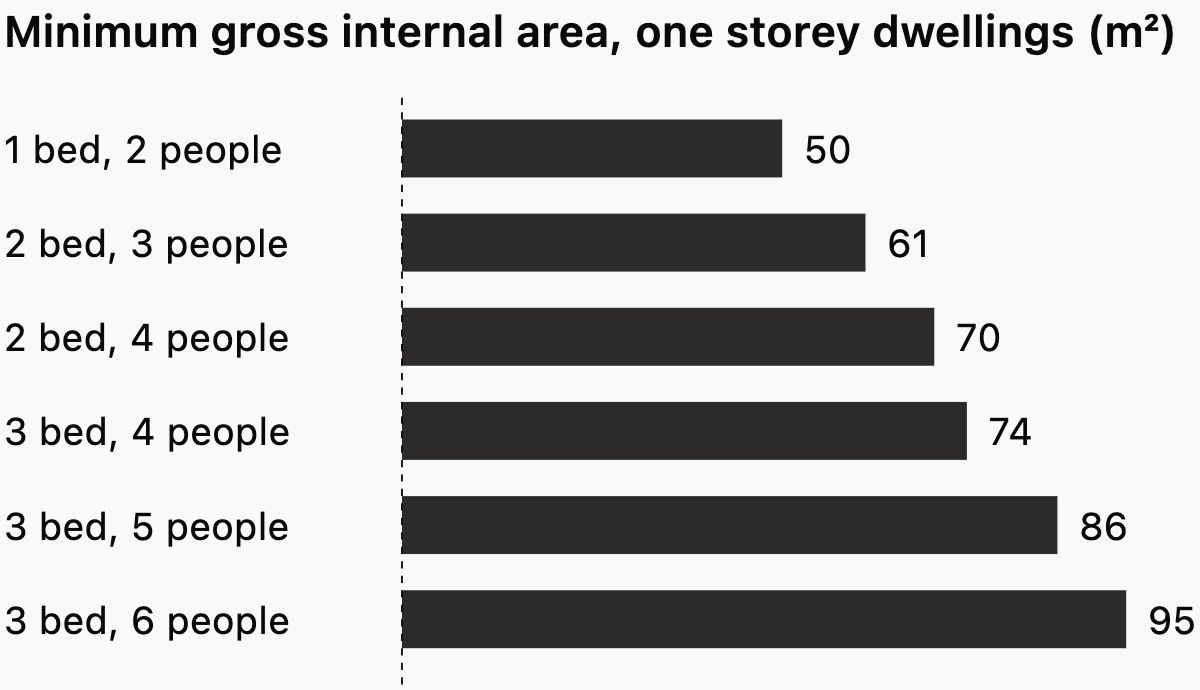
The steps between dwelling types are uneven. A fourth bedspace in a two-bedroom flat adds 9 m² to the minimum, while a third bedroom for the same four people adds 4 m². The example's 74 m² target equals that three-bedroom, four-person minimum. A client who asks for a third bedroom is asking for that home with no margin left.
In practice, width catches more rooms than area does. A long, narrow room can clear the area minimum and still miss the width. That is the trouble with the second bedroom in the opening scene. In Synaps, clicking inside a closed wall loop creates a room with a live area that re-measures whenever its walls move.
The standard also says its areas will not be adequate for wheelchair housing, meaning Category 3 homes in Part M of the Building Regulations. Confirm adoption with the planning authority. None of this is legal advice.
This step asks one thing: does every room clear its minimum on area and width, with your target margin intact?
Read adjacencies into zones
An adjacency matrix rates every pair of rooms, and the ratings tell you where shared walls and doors belong. Use three ratings. Essential means a shared wall or a direct door. Desirable means a short route that crosses no other room. Keep apart means no shared door and, where you can, a buffer such as storage between them.
The matrix for the example flat lists each pair once, so read along the row and up the column.
| Room | Living and kitchen | Bedroom 1 | Bedroom 2 | Bathroom |
|---|---|---|---|---|
| Entrance hall | Essential | Desirable | Desirable | Desirable |
| Living and kitchen | - | Keep apart | Keep apart | Keep apart |
| Bedroom 1 | - | - | Desirable | Essential |
| Bedroom 2 | - | - | - | Essential |
Read the essentials first. Each essential pair becomes a shared wall or a door on the bubble diagram. Then group the rooms with the most essentials between them into zones, and place the keep-apart pairs on opposite sides of the hall.
In the example, the hall becomes the hinge of the plan. The living and kitchen space opens off one side, with the balcony on its outer wall. The two bedrooms and the bathroom form a night zone off the other side. The bathroom sits between the bedrooms and shares a wall with each, which meets both essentials. Bedroom to bedroom is only desirable, so losing that shared wall costs nothing and helps with sound.
When two essentials cannot both be met, the brief decides which one gives. Write the trade into the schedule, so the client sees the choice instead of discovering it on the drawing. The test for this step: can every essential pair share a wall or a door without a route through a third room?
Test circulation on the plan
Circulation is the area nobody asked for, so measure it. Add the hall and any corridor, then divide by the gross internal area. In the example, the 6.0 m² hall is about 8% of the 74 m² target. Track that share across options, because it shows which layout spends area on moving instead of living.
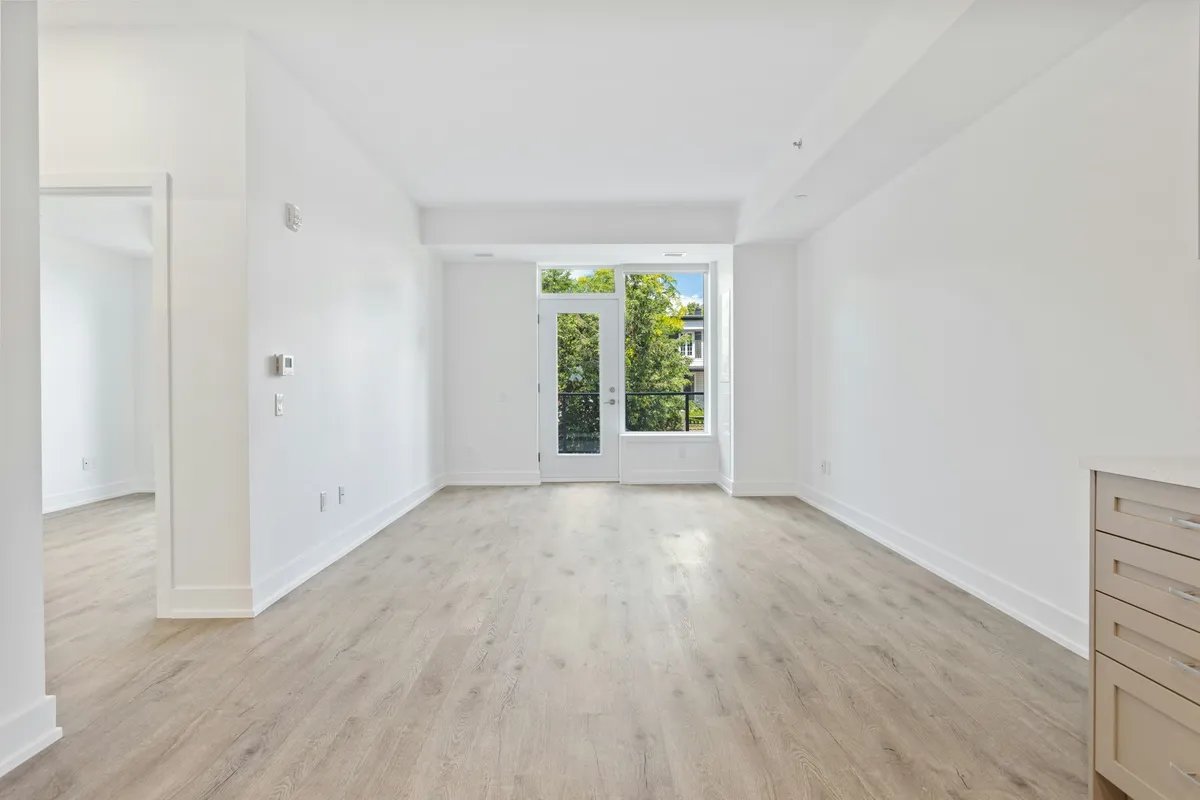
Then walk every route on the plan, from the entrance to the farthest door. Count the doors you pass through and the furniture you would step around. A route that cuts diagonally across the living room takes furnishable floor, even when the area table looks fine.
For widths, the US Department of Justice's 2010 ADA Standards for Accessible Design publish minimum clearances for routes, doors and turning space. They apply to facilities the ADA covers, and a private home is generally not one of them. Treat them as a benchmark for routes and doors, and let your local code govern.
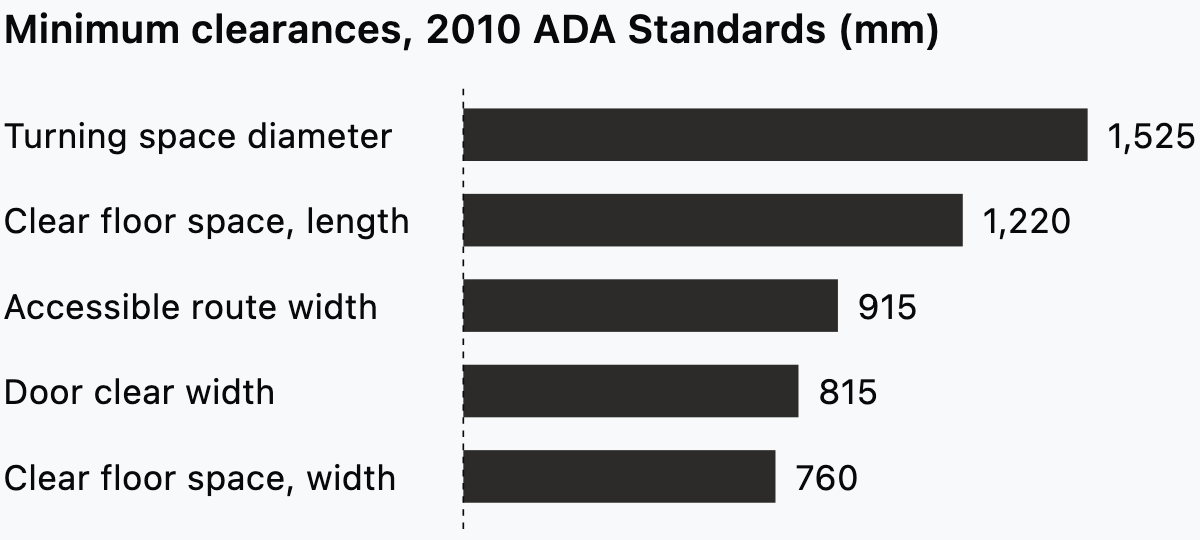
The chart gives five minimums in millimetres. The route width applies to walking surfaces, with exceptions the standards set out. Door clear width is measured between the face of the door and the stop, with the door open 90 degrees. The turning space can also be a T-shape within a 1,525 mm square.
In the example, the hall is 1.2 m wide, an example value that clears the 915 mm route benchmark. The bedroom doors are the tighter test. To get 815 mm clear, specify a leaf wider than 815 mm. The open leaf and the stop both sit inside the opening, so the clear width is always less than the leaf.
These figures sit beside the space standard without joining it. The space standard is an English benchmark for areas in new homes, written in metric. The ADA figures are US clearances, written in inches with metric equivalents. Use each for the question it answers, and never merge them into one rule.
In Synaps, the Measure tool reads corridor widths and hall areas on the canvas without adding anything to the drawing. Close this step with one question. Can you walk from the entrance to every room at full width without crossing a private room?
Furnish every room before you fix the walls
Furniture turns an area into a room, so place it before the walls are fixed. Start with the largest pieces: beds, the dining table, the sofa and the kitchen run. Draw them at true size from manufacturer data or your office library.
Then add every door swing, drawn the way the door will hang. The guide to floor plan symbols and door swings covers how leaves and arcs read on plan. A swing that hits a wardrobe or a bed corner is a layout problem, and the fix is usually a moved door.
Test the bedrooms hardest, starting with the narrow second bedroom. This example uses a 1,350 mm double bed and targets 700 mm of access on each side. Those example values add up to 2.75 m across the room. At 2.55 m wide, the bed has to go against a side wall, or the room needs more width. A smaller bed only hides the problem.
Where a wheelchair user may need to reach a bed, worktop or basin, place the clear floor space from the ADA chart beside it. That rectangle shows whether the room has the slack. In Synaps, you can drag furniture from the asset library onto the plan, then move or rotate each piece into place.
The layout is ready when every room holds its furniture with the doors open and the routes clear.
Mistakes that show up after the layout is drawn
Most layout problems that surface at dimensioning trace back to a skipped test. These come up again and again:
- Areas get read off the sketch instead of the schedule. A bedroom drawn by eye looks right until someone measures it.
- Width never gets tested. The room passes on area and then fails at the bed wall.
- External and internal measurements get mixed. A total measured to the outer wall face cannot be compared with the space standard.
- Storage is left to the end. Cupboards end up in leftover corners, and the hall grows to make room for them.
- Doors go in after the furniture. The swings then clash with wardrobes, and the fix moves a wall that was already dimensioned.
- Circulation hides inside rooms. A hall widened into a study corner still works as a corridor, so count all of it in the circulation share.
Once every test passes, the layout is ready for you to dimension the floor plan for a builder.
Space planning in Synaps
Synaps publishes this article. Synaps is browser-based architectural design and drafting software where you can draw or generate a plan, then test it with live room areas and measurements.
For the example flat, a written brief for floor plan generation could read: "Two-bedroom flat for four people, about 74 m². An entrance hall opens to a living, kitchen and dining room facing the balcony. Two double bedrooms sit off the hall, with the bathroom between them."
To take that brief from schedule to plan:
- Draw a closed rectangle or polyline for the shell if you want the plan to sit inside a boundary.
- Open Generate a floorplan from command search with Cmd/Ctrl+K.
- If you drew a shell, click Pick a boundary shape, then click your outline on the canvas.
- Enter the brief in Describe your floorplan, with the type of space, the rooms and their relationships, and press Enter.
- Develop the single editable plan that appears. The plan's walls, rooms and openings can be selected and adjusted with the drawing tools.
- Press W to add a wall. Type L for length and A for angle in the tool panel, so new walls start at the schedule's sizes.
- Click inside a closed wall loop to create a room with a centred, auto-numbered label and a live area. Double-click the label to rename it.
- Open Measure from Cmd/Ctrl+K, choose Distance in the tool panel and click two points to read a width, or switch to Area.
- Find furniture with library search or categories, drag it into the drawing and use Move or Rotate to place it.
If you want to test your next brief as a plan with live room areas, start a project in Synaps.
Frequently asked questions
What is the difference between space planning and interior design?
Space planning decides where walls, doors and rooms go, and how big each one is. Interior design works inside those decisions, with finishes, lighting, joinery and loose furniture. The two meet at the furniture layout. On a fit-out, an interior designer often space plans within a fixed shell and fixed services, so only the partitions can move.
How much circulation is normal in a flat?
Neither standard in this article sets a circulation share, so there is no published figure to hit. Compare your own options instead. A plan that opens rooms straight off the living space carries a small hall, while a corridor plan carries more. A rising share across options usually means a corridor is doing a room's job, and the client pays for floor they cannot furnish.
Which tools do architects use for space planning?
Most studios mix several. The schedule lives in a spreadsheet, and bubble diagrams go on trace paper or a whiteboard. Many reviews still happen in red pen on a print. The measured layout goes into the studio's CAD or BIM tool, such as AutoCAD, Revit or Archicad. Brief-to-plan generators are a newer starting point, covered in our guide to generating a floor plan from a brief.