AI in architecture is most useful at the start and the edges of a project, while judgement and sign-off stay with a named architect. Picture the Monday pin-up: a chatbot summary of the brief, two massing images and a traced survey plan, with nobody sure who checked them.
That pin-up raises two questions: which stages should AI touch, and what should the practice agree before it reaches client work? This guide answers the first stage by stage: the input, the output and the check that stays with you. A numbered studio policy answers the second. For tools sorted by what they produce, see our guide to AI tools for architects.
Key takeaways
- Early design visualisation is the most common use in the RIBA AI Report 2026, at around 56% of AI users.
- Sort every AI result into editable geometry or a picture. Only geometry carries on into the drawing.
- At every stage, the check and the sign-off stay with a named architect, whichever tool produced the output.
- Around 19% of practices in the RIBA AI Report 2026 say they have a documented AI policy.
- A first studio policy names an owner, approved tools, client data rules, IP terms, client disclosure and your insurer.
Where architects use AI today
The most common use in the RIBA AI Report 2026 is early design visualisation, with around 56% of AI users deploying AI there. Over 1,100 design professionals, mostly RIBA members in a UK-led survey, responded between March and April 2026. Respondents were self-selecting, so read the results as a good indication rather than a definitive measure.
Compliance checking comes second at 40%, and practice management third at 32%, which includes drafting reports and project documentation.
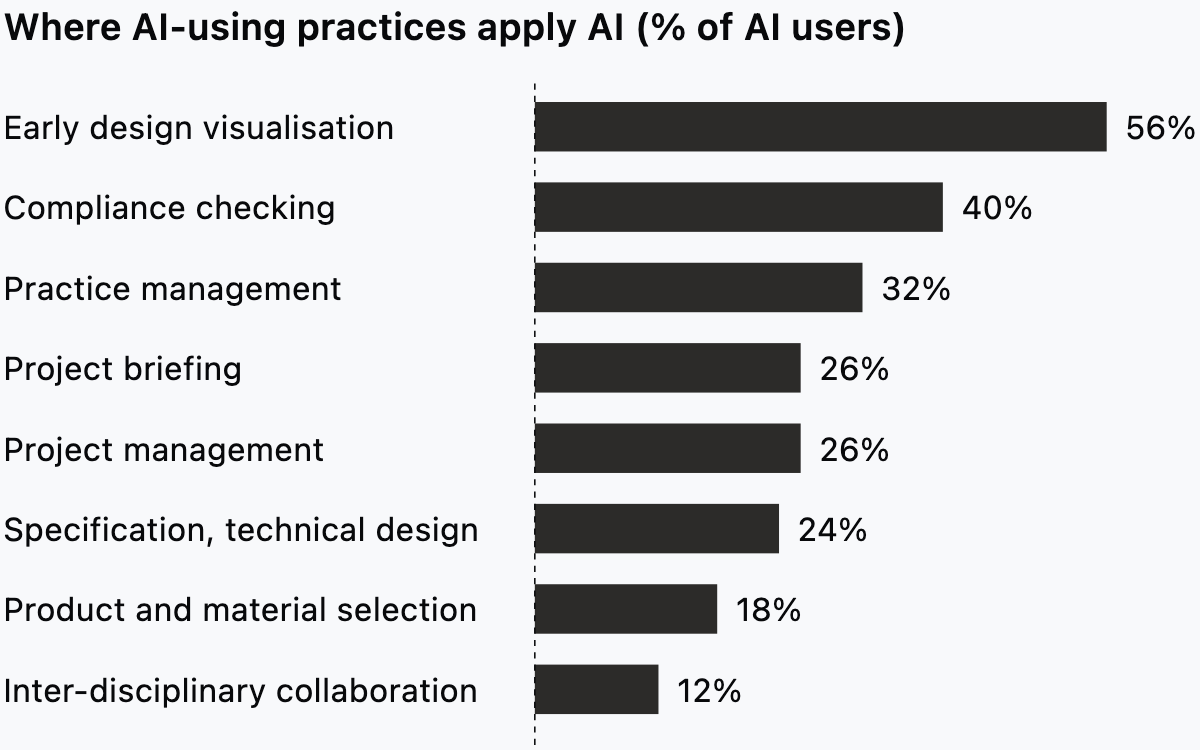
RIBA changed its question on uses this year, so treat the chart as a 2026 snapshot, not a trend.
US figures come from a different survey, reported in an AIA Architect article from March 2025. There, 79% of respondents use chatbots, 45% grammar or text analytics and 25% transcription or meeting assistants. Typical tasks are proposals, communications and editing.
Only 8% of firm leaders report integrating AI into their practices, and another 20% report they are in the process of implementing it. Individual use runs well ahead of firm-wide adoption: most respondents use a chatbot, but few firms have built AI into how they work.
The two surveys ask different people different questions, so their percentages do not add up or compare directly.
What AI gives back at each project stage, and what you check
Sort every AI result into one of two kinds before you use it: editable geometry you can develop, or a picture or text you read. Geometry can carry on into the drawing. A picture or a paragraph informs a decision and stops there. RIBA's report puts the boundary plainly: "AI is not, of course, a replacement for professional judgement and oversight."
| Stage | You give | What comes back | Check that stays with the architect |
|---|---|---|---|
| Brief and research | Brief, site notes, meeting notes | Summaries, questions, draft text | Every point traced to its source document |
| Concept and massing | Site limits, area targets, sketches | Images of form and mood | Boundary, heights and daylight against the site drawings |
| Layouts from a brief | Rooms, relationships, a boundary | A plan image or an editable plan | Areas, adjacencies and circulation against the schedule |
| Existing drawings | A scan, PDF or photo of a plan | A reference image or editable elements | Key dimensions against a measured survey |
| Interior images | A camera view, a style, a prompt | An image of the space | Openings, furniture and proportions against the plan |
| Specification, compliance and admin | Product data, regulations, notes | Draft clauses, checklists, minutes | Each clause and compliance answer signed by the responsible person |
Brief and research
You give the tool the client's brief, site notes, planning documents and meeting notes. Strip client names and personal details first, unless your studio policy allows that tool to hold them.
What comes back is text: a summary, a list of open questions or a first draft of the brief. None of it is geometry, so it shapes the next conversation rather than the drawing.
Read the summary against the documents it came from. Trace any planning policy or standard it quotes back to the original text. A missing constraint costs more than a wrong one, because nobody goes looking for it.
Concept and massing
You give site constraints, area targets, reference images and early sketches. What comes back is usually a picture: a massing image, a mood view or a set of form studies.
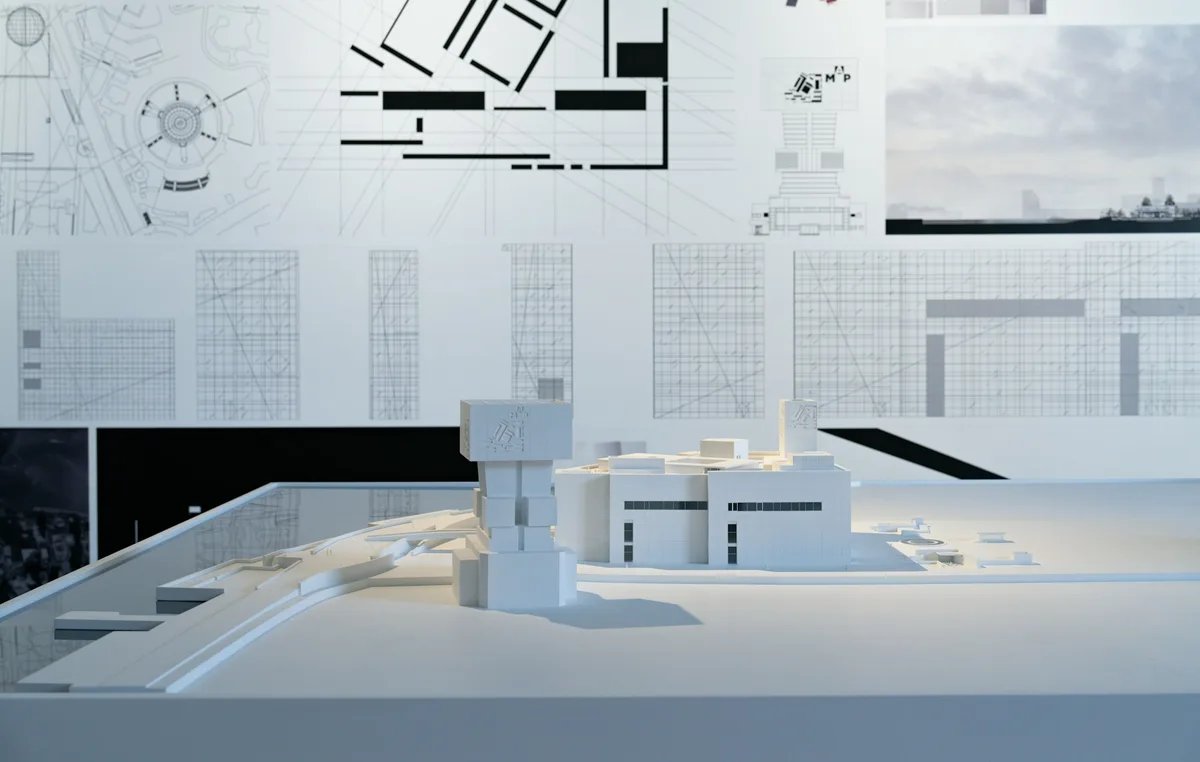
Test each image against the site drawings before a client sees it. Check the boundary, the heights, the neighbours' windows and daylight, because a picture can ignore all four. Watch for resemblance too, since an image that echoes a known building raises the imitation worry covered below. This stage sits inside the schematic design phase, where early AI work fits, while the form is still open.
Layouts from a brief
You give a written brief: the type of space, the rooms and the relationships between them. Add a boundary if the footprint is fixed.
What comes back depends on the tool: a picture of a plan, or a plan you can keep drawing.
Test any first layout the way you would test your own first sketch. Start with room areas against the schedule, then essential adjacencies, then circulation and widths. The guide to testing a layout against the brief with space planning runs those tests in order.
In Synaps, Generate a floorplan turns a written brief into one editable plan whose walls, rooms and openings you keep developing. Click inside any closed wall loop, generated or traced, and Synaps creates a room with a live area you can set against the brief's schedule.
Existing drawings
You give a scan, a PDF or a photo of a plan. On renovation, heritage and fit-out jobs, that is often the only record of the building.
What comes back is either a reference image you draw over or editable drawing elements. Synaps traces a JPEG, PNG or PDF of an old plan into editable drawing elements, instead of a picture you redraw line by line.
An old drawing records what someone once drew, not what was built. Confirm key dimensions against a measured survey before the design depends on them. Note any sheet that was scanned at an angle or copied at a different scale. For the full route from source to drawing, see our guide to converting a plan image to CAD.
Interior images
You give a viewpoint, a style and a short prompt about finishes and light. What comes back is an image, which supports a conversation with the client but carries no dimensions.
Before any generated image goes to a client, compare its openings, furniture and proportions with the drawing. Label it as a concept image, so nobody prices from it. The guide on what to send for an architecture render covers the inputs in more detail.
In Synaps, a camera placed in the plan produces an interior image as a separate item, and the editable plan stays as it was.
Specification, compliance and admin
You give product data, regulations, project notes and meeting recordings or transcripts. Recordings often hold personal data, which the policy section deals with.
What comes back is text: draft specification clauses, compliance checklists, minutes and report drafts.
Treat a compliance answer as a pointer to the clause, never as the clause itself. Trace each one to the current regulation, and have the responsible architect sign it off. Check specification text against the manufacturer's current data before anyone builds from it. This stage carries the most liability for the least visible effort, so the policy below matters most here.
What architects worry about
The worries that surveys record are specific, and most map to a rule a practice can write down. In the RIBA AI Report 2026, 76% of respondents agree that AI increases the risk of imitation, while 7% disagree. A majority, 55%, agree that AI will enable people without sufficient professional qualification to design buildings. A larger share, 61%, agree it will make it harder for early career professionals to gain the skills they need.
US architects in the AIA research reported in March 2025 expressed concerns in five areas. They are inaccuracy (94%), unintended consequences (94%), privacy and security (93%), authenticity (90%) and lack of transparency (90%).
Imitation and authenticity point to IP terms, inaccuracy to sign-off, and privacy to data rules. The early-career worry is about training, so decide who reviews a junior's AI work and talks it through with them.
The studio rules to set before AI touches client work
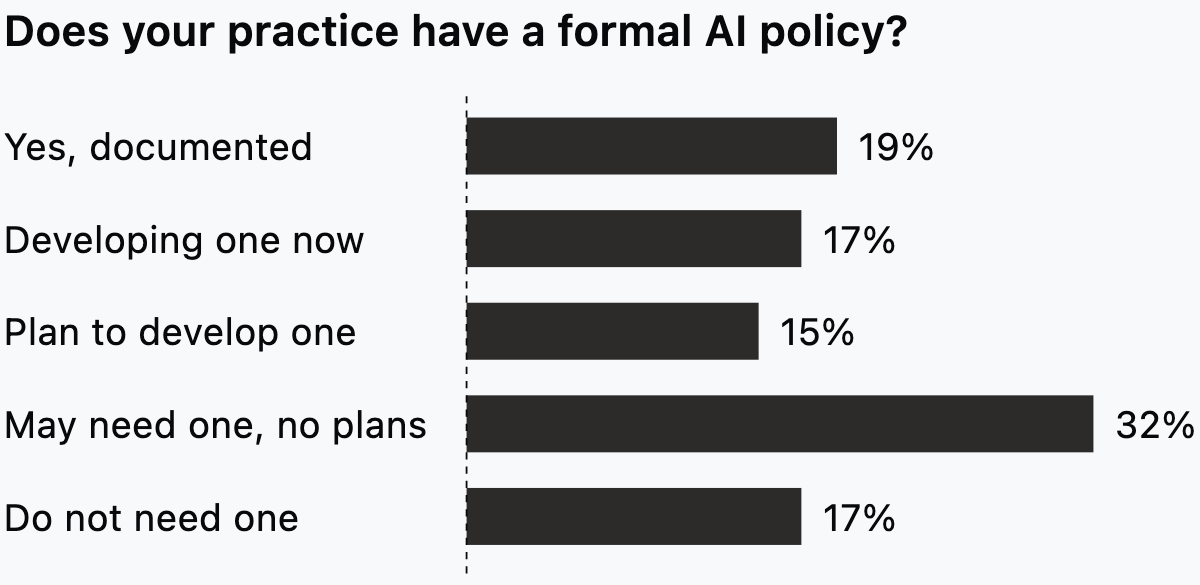
Write a one-page AI policy and agree it before anyone uses AI on a live job. In the RIBA AI Report 2026, around 19% of practices say they have a documented AI policy, a slight increase from last year. Around half either have one or intend to.
The rules below come from published guidance with different reach. The AIA guidance is written for US members and firms, while the ICO, ARB and Lockton sources are UK. None of this is legal advice, so consult your own advisers on contracts, data protection and insurance.
- Name one person who owns AI oversight. The American Institute of Architects published its Guidance for the Responsible Use of AI by Architecture and Design Firms for AIA members and firms. It was last updated on 22 October 2025 and asks firms to "Assign clear responsibility for oversight of AI tools and outputs."
- List the approved tools and the jobs each one may do. The AIA guidance includes "Approved AI systems and use cases" among the things an internal policy should address. Add a tool to the list only after someone has read its terms.
- Keep confidential client data out of unvetted tools. The AIA guidance says "Do not upload confidential client or firm data into unvetted AI systems." Before you approve a tool, find out how it stores, reuses or trains on what you upload.
- Run a data protection impact assessment (DPIA) before personal data goes into an AI tool. The ICO's guidance on AI accountability and governance, last updated 15 March 2023, covers any UK organisation processing personal data. "In the vast majority of cases," it says, AI use involves processing likely to result in a high risk to individuals' rights. That triggers the legal requirement for a DPIA.
- Settle who owns what the tools produce. The AIA guidance asks firms to "Clarify IP ownership for AI-generated content by reviewing terms of service and contracts" and to consult legal counsel as needed. Match the answer to the IP clause in your client appointments.
- Tell clients when and how you use AI. The same guidance asks firms to "Disclose to clients and stakeholders when and how AI is being used in project workflows."
- Keep review and sign-off with a qualified, named person. "All AI-generated outputs must be reviewed and validated by qualified professionals," in the AIA's words. Name the reviewer for each stage, using the checks in the stage section above.
- Talk to your insurer before AI reaches client work. Lockton, a UK insurance broker, advised construction professionals on 30 September 2025 to draw up a clear usage policy with protocols, human oversight and accountability. "Early engagement with insurers is essential," it adds.
- Date the policy and review it when the UK bodies publish. The ARB Business Plan 2026, from the regulator for the UK Register, plans a short life expert working group on AI. RIBA, writing for its members, has said it will develop an AI Overlay to the RIBA Plan of Work and a responsible use policy. We found no published guidance from either as of 19 October 2026.
Print the nine rules on one page with a date and an owner. Then walk the next live job through the stage table and name a reviewer for each row.
Using AI for early design in Synaps
Synaps publishes this article. The product is browser-based architectural design and drafting software. In it, AI turns a brief into an editable plan and traces an image or PDF into editable drawing elements. A camera in your plan gives you an interior image.
To take a brief, an old plan and a camera view through it:
- If the footprint is fixed, draw a closed rectangle or polyline larger than 20 m².
- Open Generate a floorplan. If you drew a boundary, click Pick a boundary shape and select your outline.
- Enter the brief in Describe your floorplan, with the type of space, the rooms and the relationships between them.
- Develop the single editable plan that appears. You can select and adjust its recognised walls, rooms and openings with the drawing tools.
- Click inside a closed wall loop to create a room with a centred, auto-numbered label and a live area.
- For an existing plan, drop the JPEG, PNG or PDF onto the canvas and choose Trace.
- In Import a floorplan, adjust the region bounds to cover the plans you want, then click Trace Floorplan.
- Choose Camera, click to place it, then move the pointer to aim it and click again to set its direction.
- With Select active, select the camera, choose an interior style or No style, add a prompt if you want one and click Apply.
If you want to turn your next brief into an editable plan, start a project in Synaps.
Frequently asked questions
Should we tell clients when we use AI on their project?
Tell them, and put it in writing at the start of the job. Add a short paragraph to the fee proposal or appointment. Name the stages where you use AI, the kind of output and who signs it off. The US AIA guidance expects disclosure. None of the UK sources here sets a disclosure rule, so for a UK job the practice decides. A client who finds out later may ask what else they were not told.
How do we decide which stage to start with?
Start where your own hours go. A renovation practice spends its hours on existing drawings, a housing practice on early layouts. Then pick a stage whose check your team already knows how to make, using the stage table above. For the layout stage, what to check in a generated floor plan sets out the tests.
What does a one-person practice need in an AI policy?
In RIBA's report, 43% of smaller practices (one to nine staff) have no plans to develop an AI policy, and 29% see no need. A sole practitioner still holds client data and carries professional indemnity cover. Four rules matter even at that size: keep client data out of unvetted tools, tell clients when you use AI, and tell your insurer. The fourth is a DPIA before personal data goes into an AI tool, as the ICO expects in the vast majority of cases.