Floor plan symbols are a plan's shorthand for openings, fixtures, references and levels, and the legend on the set decides what each one means. Picture a new hire's ground floor plan with door swings drawn three ways, each copied from a different old job.
None of the three versions is wrong on its own. The trouble starts when a contractor or consultant has to guess which convention applies on which sheet. This guide covers what the common symbols tell the reader and who publishes reference sets. It ends with a method for one office symbol standard.
Key takeaways
- Symbols vary by office and by country, so the legend issued with the set is what defines them.
- Door and window symbols carry information: hinge side, swing, leaf width and, for windows, the sill line. Draw them one way on every sheet.
- Section cuts, elevation markers, grid bubbles and level datums tie a plan to other drawings, so their numbers must match the sheets they point to.
- The US National CAD Standard and BS 8541-2 publish reference symbol sets. Both are recommendations that a practice chooses to follow.
- One office standard needs a legend sheet, symbols drawn once as reusable blocks, written line weight rules, one owner and a symbol check before issue.
Walls, openings and the line weights that carry them
A plan reads through line weight before anyone looks at a symbol. Walls cut by the plan plane take the heaviest line, so the eye finds the structure first. Elements seen below the cut, such as worktops, steps and floor finishes, drop to a lighter weight. Elements above the cut, such as high-level cupboards or a roof overhang, go dashed.
Poché, the fill inside cut walls, adds a second signal. Some offices fill every cut wall solid. Others hatch by material, so masonry, timber stud and concrete read differently at a glance. Either approach works when the legend says which one you use and every sheet follows it.
Door symbols
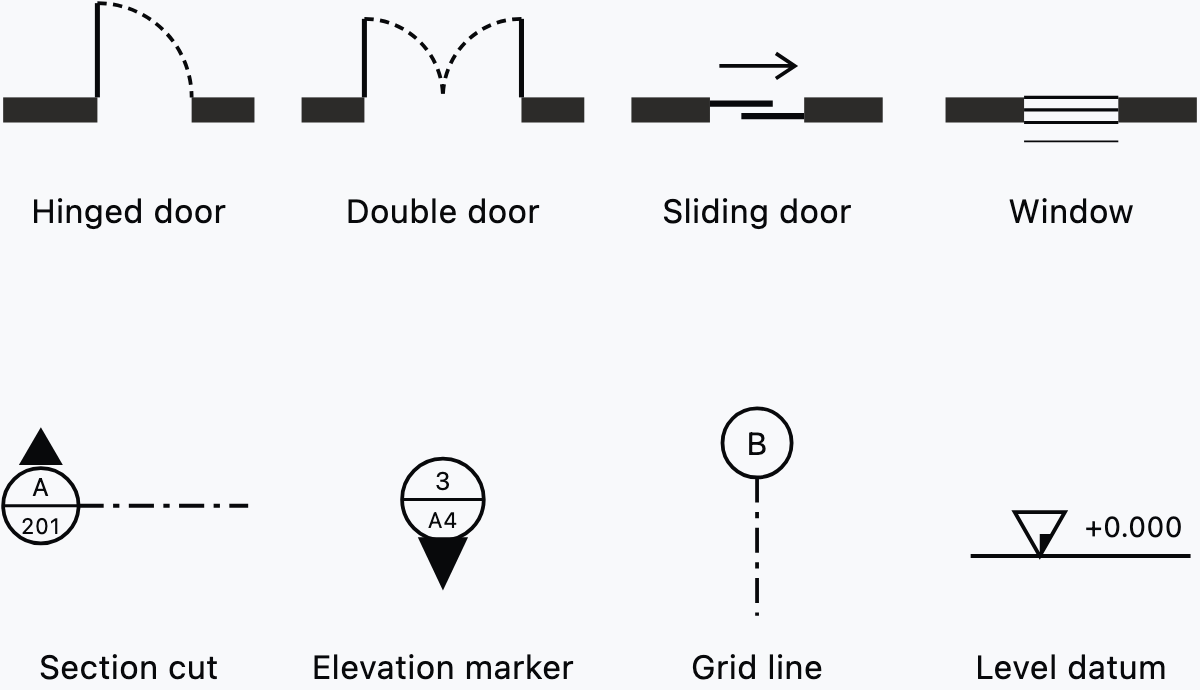
A hinged door symbol carries three pieces of information: the hinge side, the swing direction and the leaf width. The clear opening sits in the door schedule. Draw the leaf at its full open position and the arc from the leaf tip back to the closed position. Keep the arc lighter than the leaf, or dashed, so the swing never reads as a wall.
A double door shows two leaves and two arcs meeting at the centre. A sliding door shows the leaves offset in the opening, often with an arrow for the direction of travel. A pocket door adds its leaf as a dashed line inside the wall it slides into. Draw every swing the way the door will be hung, because the arc is how readers test clearances.
Door tags link the symbol to the door schedule. The tag carries the number, and the schedule carries the size, fire rating and ironmongery. For where tags sit against the dimension strings around an opening, see the guide to dimensioning a floor plan.
Window symbols
A window symbol shows the frame within the wall thickness and the glass as one or two thin lines. The sill is a line on the outside face. Some offices add the opening type, such as a dashed arc for a casement. Sill height belongs in the window schedule or a note, because a plan cannot show it.
In Synaps, you click a wall to set an opening's position, choose its direction, then click again to place the door or window. Width and Height sit in the opening's Geometry controls, with Sill as a third value for a window.
Stairs, fixtures and furniture
A stair on plan shows treads as parallel lines, a direction arrow and a break line where the plan plane cuts the flight. The arrow starts at the level the plan shows and is labelled UP, or DN on the floor above. Beyond the break line, offices either dash the treads or leave them out.
Fixtures are architectural symbols drawn at real size. A WC, basin, bath, shower tray or kitchen sink drawn at its true footprint lets anyone check clearances from the plan alone. Take sizes from the manufacturer or from an office block, and never draw a fixture by eye.
Loose furniture plays a different role. Furniture tests a room layout and helps clients read scale, but nobody builds it from your drawing. Draw it at a light line weight on its own layer, so you can switch it off for issues that should show only fixed elements.
Services symbols sit on the plan too, but they rarely start with the architect. Sockets, switches, lighting and drainage symbols usually come from the services engineer's legend. BS 8541-2 defers mechanical, electrical and plumbing symbols to "those institutes that have a greater understanding of the needs of their members". Point your legend to the engineer's legend rather than redrawing their symbols.
Reference and annotation symbols
Reference symbols link one plan to the rest of the set, and they are often the first thing to break. A section cut pointing to a renumbered sheet sends the reader nowhere. A grid that differs from the structural engineer's grid makes every setting-out question harder to answer.

Most of these architectural drawing symbols share one pattern: a circle split by a line. The top half names the drawing, and the bottom half names the sheet it sits on. An arrow or pointer shows which way the view looks. The table lists the common ones, what each points to and what to check before the sheet goes out.
| Symbol | What it points to | What to check |
|---|---|---|
| Section cut | A section drawing, by drawing number and sheet number | The section exists on that sheet and looks the way the arrow points |
| Elevation marker | An elevation drawing, with the pointer showing the face drawn | The number matches the elevation title on the target sheet |
| Detail callout | An enlarged drawing of the area inside the boundary | The boundary encloses the area the detail actually shows |
| Grid bubble | A setting-out line shared by plans, sections and structural drawings | Letters and numbers match the structural grid |
| Level datum | A height above the project datum | The datum and its units are stated in the legend or notes |
| North arrow | True north, or project north where the legend says so | Every plan in the set points the same way |
| Room tag | A room name and number used in schedules and finishes | Each number is unique and matches the room schedule |
| Door tag | A row in the door schedule | Each tag appears once on the plans and matches its schedule row |
Draw annotation symbols at a fixed plotted size, whatever the drawing scale. A grid bubble should print at the same diameter on a 1:50 plan and on a 1:200 site layout. The guide to architectural drawing scales covers how plotted size and drawing scale relate.
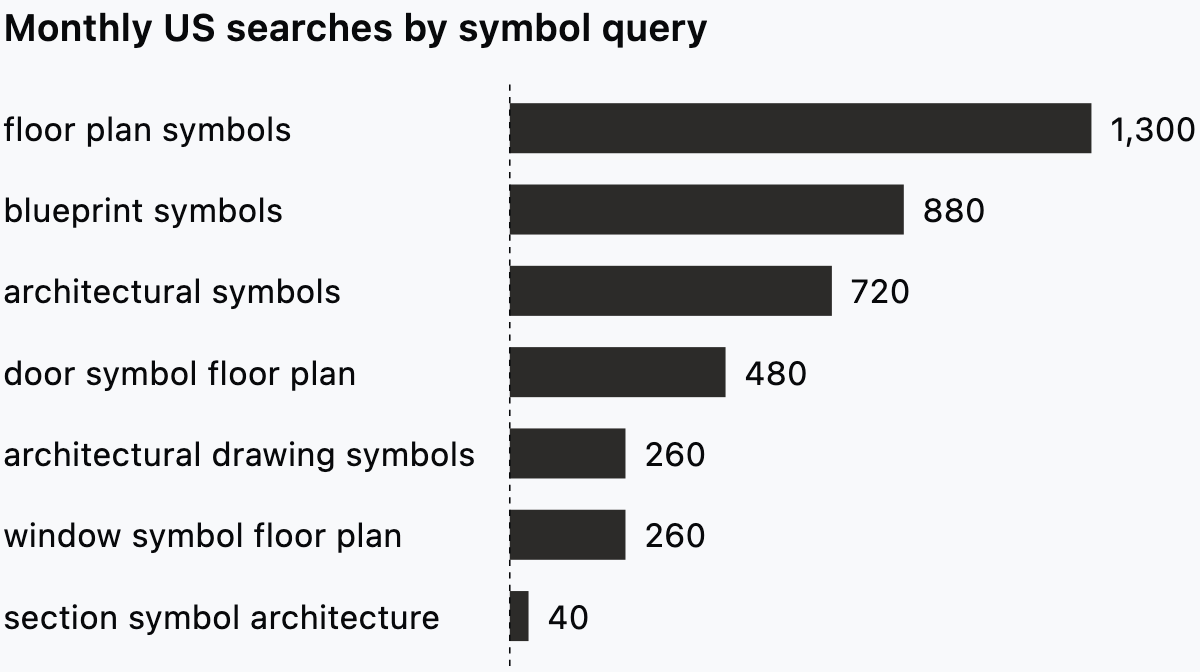
Search demand leans towards whole sets, such as floor plan symbols or blueprint symbols, rather than single symbols. Of the single-symbol queries we pulled, the door leads at 480 US searches a month, ahead of the window at 260. The section symbol barely registers at 40.
Who standardises floor plan symbols?
Two national references set out symbol sets, one in the US and one in the UK.
The US National CAD Standard
The Construction Specifications Institute's page on the United States National CAD Standard states that adoption by the industry "is voluntary". The standard combines the AIA CAD Layer Guidelines, CSI's Uniform Drawing System and the NIBS BIM Implementation and Plotting Guidelines.
Symbols have their own module within the Uniform Drawing System. That module sorts them by MasterFormat 2004 numbers and division titles, with a unique three-digit extension for each symbol. A separate Drafting Conventions module also touches symbols, alongside line types, material indications, notation and cross-referencing.
The library is large. When Version 6 came out in 2014, FMLink reported that more than 1,300 NCS symbol CAD files were replaced and renamed. We found no newer count, so treat that figure as a 2014 snapshot. A US practice can pick the symbols its work needs and name the NCS as the source in its legend.
BS 8541-2 in the UK
In the UK, BS 8541-2:2011 gives "guidance and recommendations" for symbols and graphic conventions, primarily for those preparing drawings. Its scope is restricted to architectural and land registry symbols. Symbols for mechanical, electrical and plumbing services, structural steel sections and welding are deferred to the institutes for those fields.
The compendium sorts symbols into six groups: information devices, materials in section, land use, landscape, building components, and pipes, ducts, drains and sewers. Pipes and drains get a group of their own, even though detailed services symbols sit outside the standard. BS 8541-2 supersedes BS 1192-3:1987, which is withdrawn.
For a UK practice, that boundary matters at coordination. Your services engineer may work from a different reference, so expect their symbols to carry their own legend.
How the two references differ
The two documents are organised differently. The US module files symbols under specification divisions, while the British Standard groups them by what they represent. A practice working in both countries should choose one reference per project and say which in the legend.
Set up one symbol standard for the practice
An office symbol standard is a short written rule set plus a library of symbols drawn once. Five parts make it hold across jobs and across people.
Put a legend sheet in every set
Draw a legend that shows every symbol, line type and hatch the set uses, with a one-line meaning beside each. Issue it as the first sheet of the set or as a legend panel on each plan sheet. The guide to the architectural title block covers how that panel sits beside the sheet information.
Name the reference your legend follows, such as the NCS or BS 8541-2, and mark any symbol you changed. The legend is the one place that settles a doubtful mark.
Draw each symbol once
Draw every annotation symbol once and keep it as a reusable block. That covers the grid bubble, section mark, elevation marker, detail callout, level datum, north arrow and the room and door tags. New copies then come from the library, never from an old job.
In Synaps, select a grid bubble's lines and text and press Cmd/Ctrl+B to make a reusable block, so every copy shares its contents. Double-click the block to edit those shared contents, and the change reaches every instance.
If consultants receive your drawings as DXF, send them a test sheet before the first issue and look at how the symbols arrive. The guide to CAD file formats covers what each exchange format carries.
Fix line weights and line types
Write the line rules down, with real pen values, so nobody sets them by eye:
- Cut walls take the heaviest weight.
- Elements below the cut take a medium weight.
- Fixtures, furniture and hatch lines take a light weight.
- Elements above the cut and hidden elements are dashed.
- Grid lines are a chain line of long and short dashes at the lightest weight.
In Synaps, set the stroke weight in points and switch hidden lines from Solid to Dash, then set the dash and gap lengths. Give cut materials a Hatch fill, whose settings cover pattern, line weight, scale and rotation, so each material can get one fixed recipe.
Name the symbols and give them one owner
Name each block for what it is and its version, such as grid_bubble_v2 or section_mark_v3. Keep the library in one shared place and give it one owner, usually the design lead or a senior technologist. The owner approves changes, updates the legend and tells the team when a symbol changes. Without an owner, every job grows its own variants.
Check symbols before issue
Run a short symbol check on every sheet before it goes out:
- Every symbol on the sheet appears in the legend.
- Section, elevation and detail references point to sheets and drawing numbers that exist.
- Grid letters and numbers match the structural drawings.
- Door and room tags are unique and match their schedules.
- Annotation symbols print at the standard size on every sheet.
- Door swings match how each door will be hung.
Mistakes that make a plan misread
A misread plan usually traces back to one of four habits, and the office standard above prevents each one.
Symbols copied from several sources
The new hire's three door swings are the typical case. Symbols pasted from old jobs and consultant files drift apart in size, weight and meaning. Replace them with library blocks before the first issue.
Swings that contradict the plan
A door that opens into a corridor or across a stair landing leaves the reader unsure whether the plan or the symbol is wrong. Check every swing against how the door will be used.
Tags that drift from the schedules
Doors and rooms get added and renumbered as the design moves. A tag that no longer matches its schedule row is worse than no tag. Renumber the plan and the schedule in the same sitting.
Symbols that scale with the drawing
A section mark drawn at model size for a 1:50 plan prints at a quarter of the size on a 1:200 plan. Size annotation symbols for the printed sheet instead.
Draw and reuse plan symbols in Synaps
Synaps publishes this article. Synaps is browser-based architectural design and drafting software where you can draw a plan's walls, openings, rooms and annotations and keep reusable symbols as blocks. To set up the symbols on a plan:
- Choose Door or Window, click a wall to set the position, then choose the direction and click again to place the opening.
- In the opening's Geometry controls, set Width and Height, and set Sill for a window.
- Click inside a closed wall loop to create a filled room with a centred, auto-numbered label and a live area. Double-click the label to edit the name.
- Draw a grid bubble, section mark or north arrow from lines and text, select the shapes and press Cmd/Ctrl+B.
- Set stroke weights in points, switch dashed line types to Dash and give cut materials a Hatch fill.
- Place a dimension with D, text with T or a leader callout with Shift+D.
- Rename and lock the symbol groups in the Layers panel.
Frequently asked questions
Do floor plan symbols change by country?
Yes. The NCS sorts its symbols by MasterFormat division, while BS 8541-2 sorts them by what each one represents. Offices in the same country also vary the details, such as how they dash a swing or hatch a wall. Name the reference your legend follows, so a reader from another country knows where to look.
What does a triangle mean on a floor plan?
Usually one of two things. A triangle sitting on a short horizontal line with a value beside it is a level datum, giving a height above the project datum. A triangle with a number inside, often next to a cloud, is a revision tag that points to the revision box. The guide to redline drawings and revision clouds covers that second use. When the legend does not say which, ask the author before you rely on it.
How do you read a symbol you do not know?
Start with the legend, then the general notes. If the symbol carries a drawing or sheet number, follow it to the drawing it points to. Then look it up in whichever reference the legend names. If none of that settles it, raise a query with the author and keep the answer with the job.
Do consultants have to use your symbols?
Not usually, unless the appointment says so. Each discipline tends to keep its own symbols and its own legend. Agree the shared ones at the start of the project: grid, levels, north point and sheet referencing. Those four are what let a reader move between your sheets and the engineer's without translating.
Should a legend list every symbol or only the unusual ones?
List every symbol that appears on the set, including the door swing and the north arrow. A symbol that looks obvious to you may be drawn differently in the reader's office or country. A full legend also gives the pre-issue check its list.