Floor plan dimensions tell a builder where each wall, opening and column goes, measured from points they can find on site. Picture a site manager on a Monday morning, tape hooked on the slab edge, looking for where the kitchen wall starts.
Your plan is in their other hand. The string along the north wall reads 900, 3600, 150 and 4200, and the overall says 8900. Those figures add up to 8850. Nothing on the sheet says whether 3600 runs to the plaster or to the blockwork. So they will phone you, or they will guess.
Key takeaways
- Dimension in parallel strings outside the building: openings nearest the wall, then grid or structure, then the overall. Each string should add up to the one outside it.
- Offices choose differently between finished face, structural face and centre line. Pick one for each kind of element, state it in a general note and keep it on every plan.
- Give each dimension once, in one place, and never leave the builder to scale the drawing.
- In England, gross internal area has two common definitions. The nationally described space standard measures to the finished surface, while RICS measures to the structural wall or its plaster coat.
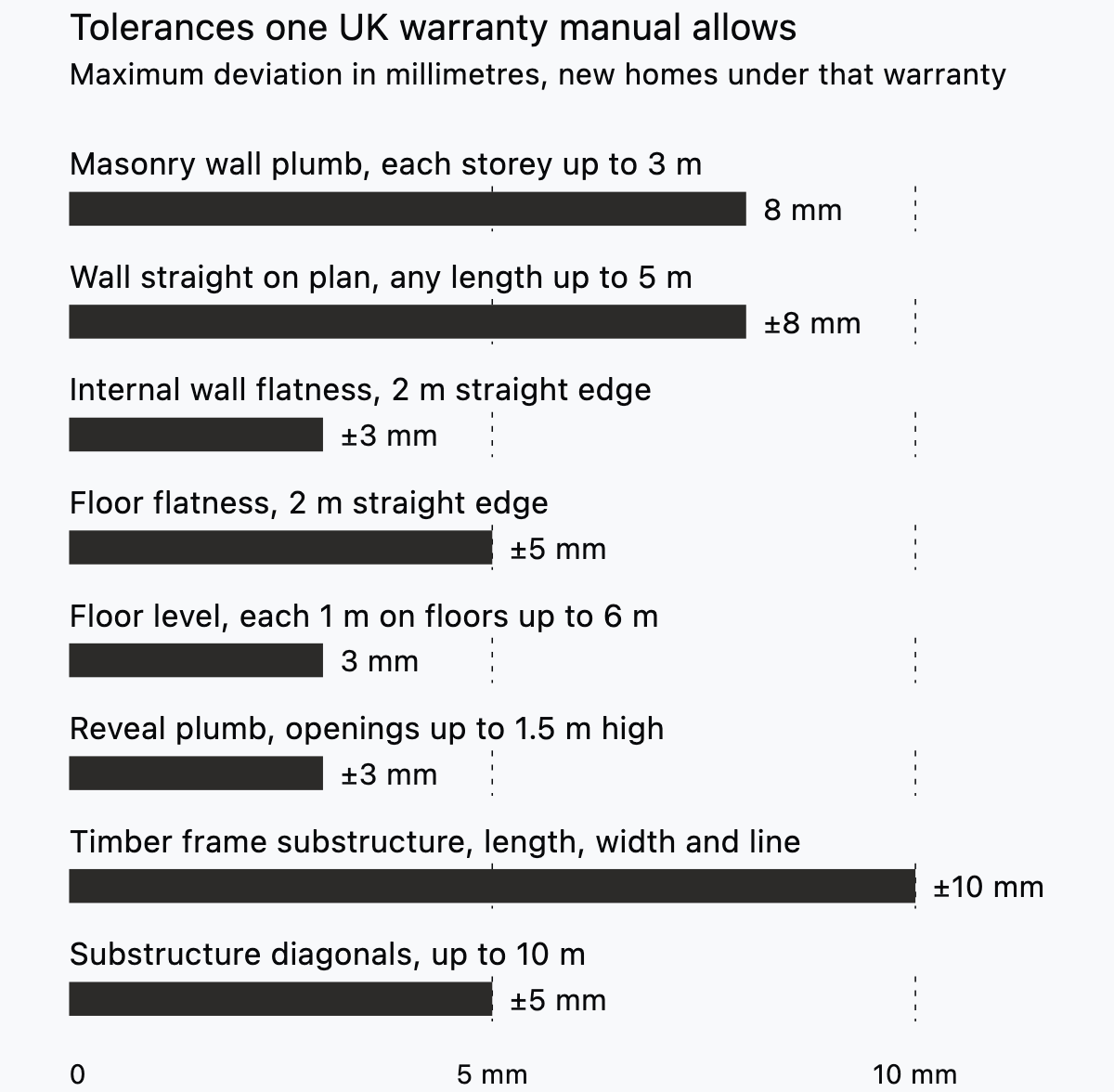
- The builder works within tolerances. One UK warranty manual sets a timber frame substructure within ±10 mm in length, width and line, so leave room wherever a fixed component must fit.
What a dimensioned floor plan must let a builder do
A dimensioned plan must let the builder set out the building and place every wall and opening without scaling the drawing.
Setting out starts from a few fixed points. Designing Buildings Wiki puts it plainly: "Controlling dimensions and references on the plans will determine the positioning of the building" (Designing Buildings Wiki, Setting out). On a framed building, the grid carries that job. "The intersections of the grid lines mark the centre points for isolated or pad foundations."
Good architectural dimensioning gives every figure a start point the builder can find: a grid line, a corner or a face already built. A US federal engineering handbook adds two tests. "Dimensions must be accurate and adequate." And "Care must be taken to show a single dimension only once in its proper location" (USDA NRCS, National Engineering Handbook Part 641). A figure given twice will one day be revised in only one place.
What to dimension and in what order
Dimension in parallel strings outside the building, with the smallest parts nearest the wall and the overall furthest out. Three strings cover most plans of everyday buildings.
| String | What it measures | Where it sits |
|---|---|---|
| Openings | Wall ends, door and window openings, piers between them | Nearest the wall |
| Grid or structure | Grid lines, columns, loadbearing walls, steps in the outline | Middle |
| Overall | Total length of each face of the building | Furthest from the wall |
Los Alamos National Laboratory's CAD standard also works outwards to the overall, and starts its progression at centre lines: "Place dimension lines in a logical progression (i.e., centerlines, projections, overall, etc.)" (LANL CAD Standards Manual, Section 200). The same manual states that "Grid lines are used as a basis for dimensioning."
Inside the building, add short strings for internal walls, each tied back to a grid line or an external face. Run at least one string across the whole plan in each direction, through every room. No partition should float without a route back to the outside strings.
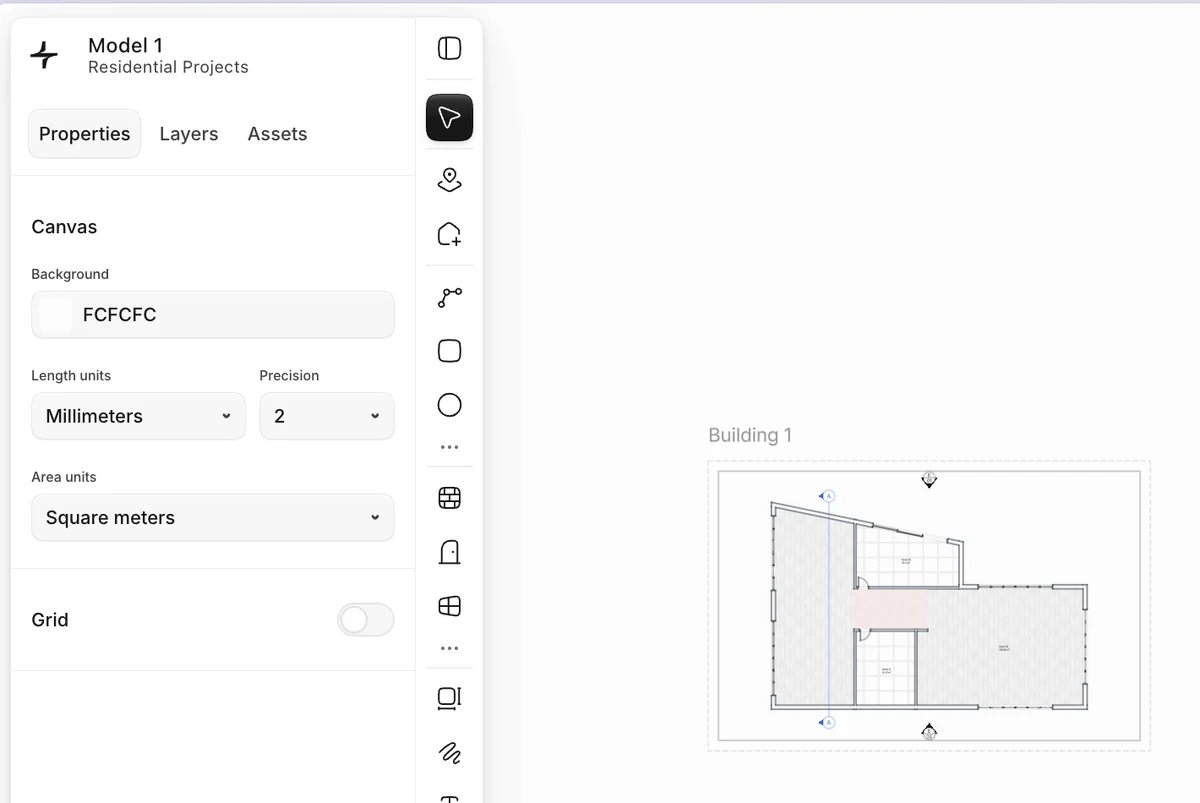
In Synaps, chained dimensions run end to end along a wall. Horizontal or Vertical orientation measures only the horizontal or vertical distance, which keeps a string square on an orthogonal grid.
Which face to dimension from, and how to say so
Pick one reference for each kind of element, write it in a general note and keep to it on every sheet. Offices choose differently, and none of the standards cited in this guide settles the question.
Three references cover nearly every case:
- Structural face: blockwork, studs or concrete. The builder can set out from it before finishes go on, so it suits walls and openings in new work.
- Finished face: the plaster or lining. Use it where a clear size matters, such as a minimum bedroom width or a fitted kitchen run.
- Centre line: grid lines and columns, and in some offices stud partitions and door openings.
The general notes should list the units, the reference face for each element type, and which walls are existing and which are new. One line can carry the face: "Dimensions are to structural faces unless marked clear." Then mark every exception at the figure itself. A plan that mixes references without saying so produces the Monday phone call.
Existing walls follow a different logic. On a renovation, you measure existing walls on site, so those figures usually run to finished faces. The guide to as-built drawings covers how to survey them.
Whichever face you choose, the dimension must start exactly on it. Creighton University's CAD standard says "Dimension definition points should be located with an appropriate Object Snap" (Creighton University, Planning and Design Consultant CAD Standards). The same standard states that "Manual input of dimension text or otherwise over-riding the actual dimensions is NOT acceptable".
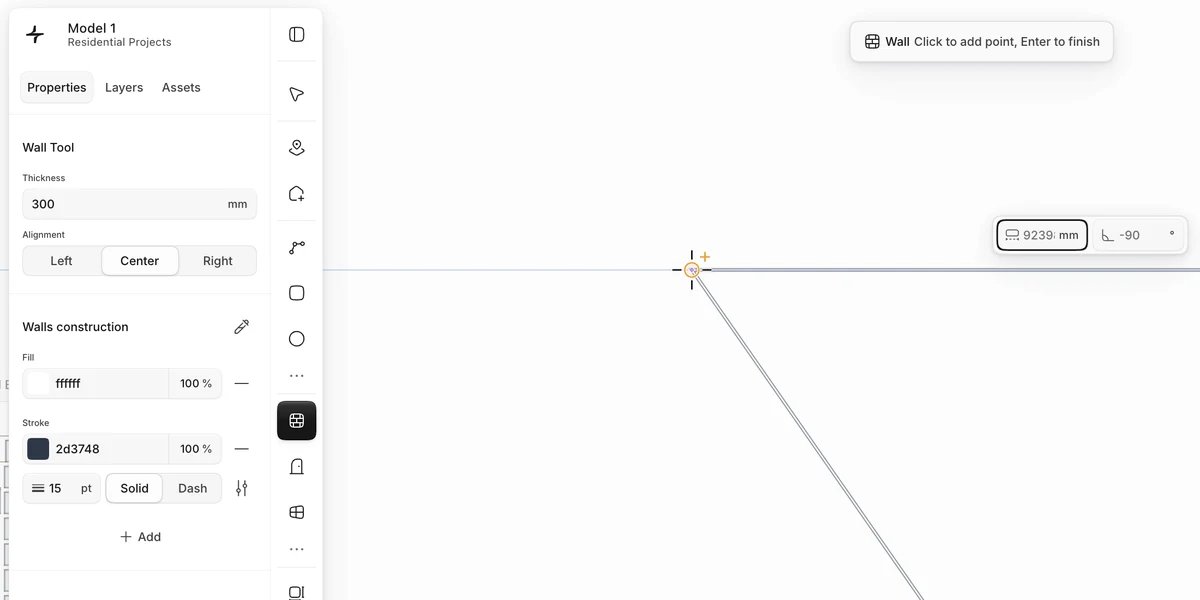
Synaps snaps dimension points to wall nodes, endpoints and intersections. Check that each point sits on the face your note names before you run the string.
Units and notation for floor plan dimensions
Use one unit system, state it once on the sheet and keep the notation the same on every plan. Metric and imperial drawings follow different habits.
On metric plans, write lengths in millimetres without a unit symbol and say so in a general note. Write levels in metres. Designing Buildings Wiki notes that in UK setting out, levels and vertical dimensions are expressed "in metres to three decimal places" relative to the temporary bench mark (Designing Buildings Wiki, Setting out). So a floor level reads +0.150 while the wall beside it reads 3600.
On imperial plans, LANL's standard says to "Specify dimensions of less than one foot in inches" and "Specify dimensions one foot and over in feet and inches" (LANL CAD Standards Manual, Section 200). That gives 8" for a short return and 2'-6 1/4" for a door opening. The manual also says "Do not stack fractions."
The same manual uses tick marks on architectural drawings and says dimension text "must be read from the bottom or right side of the drawing sheet."
Text has to stay legible once printed. Three owner standards, from Los Alamos, Creighton University and Illinois State University, set these printed heights.
| Owner standard | Rule for dimension text |
|---|---|
| Los Alamos National Laboratory | 3/32 inch minimum for any text, dimension text 1/8 inch Arial |
| Creighton University | Not less than 1/8 inch on printed drawings |
| Illinois State University | 3/32 inch text with 3/8 inch baseline spacing |
Those are paper sizes, so model text grows with the scale. UC Riverside's standard lists 4.8 inches at 1/4" = 1'-0" and 9.6 inches at 1/8" = 1'-0" (UC Riverside PDC, CAD standards). Both print at 0.1 inch, which is below the 1/8 inch that Creighton and LANL ask for. Check the owner's minimum before you set the scale factor. The guide to architectural drawing scales covers choosing the scale itself.
Room sizes and areas
Give each room a clear size or an area, and say which face the area is measured to.
Some owner standards ask for an area in every room. Creighton's states: "Each room will have the square feet listed and the text should appear as such: 100 S.F." (Creighton University, CAD Standards). On a metric plan, write the area in square metres, such as 12.4 m².
The nationally described space standard for England defines gross internal area as floor space "measured between the internal faces of perimeter walls" (DCLG, Technical housing standards). Its footnote fixes the face: "The internal face of a perimeter wall is the finished surface of the wall."
RICS uses the same words with a different meaning. Bradford council quotes the RICS Code of Measuring Practice: GIA is measured "to the internal face of the perimeter walls at each floor level" (City of Bradford MDC, How to measure floorspace). Under RICS, that face means "the structural wall or plaster coat applied to the structural wall, not the surface of internal linings installed by the occupier" (Designing Buildings Wiki, Gross internal floor area).
The two definitions name different faces. Where an occupier has lined a wall, one room can give two different areas. Label every area schedule with the definition you used.
Where a council applies the space standard, it also sets widths to dimension directly. A single bedroom must be at least 2.15 m wide, the first double 2.75 m and every other double 2.55 m (DCLG, Technical housing standards). Floor space with headroom under 1.5 m is left out of the area unless used solely for storage.
A room defined in Synaps from a closed wall loop carries a live area that re-measures when you move its walls.
How to check that dimension strings add up
Add every string and compare it with the string outside it, then with the overall.
- Sum each opening string and compare it with the grid or structure string beside it.
- Sum each grid string and compare it with the overall, and the overalls of opposite faces with each other.
- Follow each internal wall back to a grid line or an external face.
- Look for any figure given twice, and delete one.
- Check the grid against the structural engineer's grid and against every other floor.
Back to the kitchen wall. The north string summed to 8850 against an overall of 8900. Find those 50 mm before the sheet leaves the office. Fix the geometry or the source figure, never the dimension text. Then issue the plan at a stated scale, and keep the source geometry for consultants who need it.
In Synaps, Measure works as a temporary on-screen ruler, so you can check a string against the overall without adding anything to the drawing.
Tolerances: how far built work can differ from the plan
A plan dimension is the target the builder sets out to. Setting out, straightness, level and flatness each carry their own tolerance on site. One UK warranty manual shows the values it accepts for new homes.
LABC Warranty's Technical Manual sets a timber frame substructure "Within +/-10mm in length, width and line" (LABC Warranty, Technical Manual V11, Section 20). A wall may also be out of straight on plan by up to ±8 mm in any length up to 5 m.
Small deviations also stack up. Designing Buildings Wiki notes that "variations can accumulate when a number of components are assembled" (Designing Buildings Wiki, Construction tolerances). Its example is blunt: if a double glazing unit "is even a millimetre larger than the opening for which it is intended, it simply will not fit".
So design the gaps. Where a made-to-size component meets built work, such as a window, a fitted kitchen or a stair, leave a fitting allowance and dimension it. Add a note asking the builder to measure the built opening before anything is ordered.

How to read floor plan dimensions you receive
Read the general notes first, then the strings from the outside in. A floor plan with dimensions from another office follows that office's habits.
- Find the unit note and the reference face. If neither is stated, ask before you use any figure.
- Add one string yourself. If it does not close, report it rather than choosing the figure you prefer.
- Look for marks that change the reference, such as "clear", "finish" or a centre line symbol.
- Separate existing walls from new ones.
- Where a figure is missing, ask for it. Do not scale it off the sheet, even when the scale bar looks right.

Dimensioning a floor plan in Synaps
Synaps publishes this article and makes browser-based drafting software for floor plans. Sources and Synaps features were checked on 8 October 2026. The job is to put strings on a drawn plan, check them against the overall and issue a sheet the builder can use.
- Press D and place a dimension in three clicks: start point, end point, then the offset line.
- Set placement to Chained to run a string end to end, and press Enter to finish the run. Chained-locked keeps the same direction and offset.
- Click inside each closed wall loop to create a room with an auto-numbered label and a live area.
- Use Measure to check each string against the overall.
- Set a paper to an ISO sheet size at 1:50 or 1:100 and export it as PDF for the builder. For a consultant who needs geometry, export DXF, then open it in their CAD application and check the units and a known dimension.
Dimensions are static annotations, so they do not follow a wall you move after placing them: edit or replace them. Automatic dimensions are planned for the Iceberg release and were not available on 8 October 2026.
Dimension your next plan in Synaps and check every string against the overall before you issue it.
Frequently asked questions
What does "do not scale" mean on a floor plan?
The note tells the reader to use only the written figures and to keep a ruler off the print. A 1:50 sheet printed to fit is no longer 1:50. If a figure is missing, the builder should ask the architect. Put the note on every sheet, then make sure the plan never needs scaling.
Should door openings be dimensioned to the centre line or to the edges?
Either works if the note says which. Many offices dimension the structural opening edges, because that is what the builder forms. A centre line suits a door centred on a corridor or a window centred on a room.
Can I trust dimensions on a plan converted from a PDF or a scan?
Not until you check one. A scan can be stretched, and a converted file can carry the wrong units. Compare one known written dimension, such as an overall, with the drawn length. When Synaps imports a DXF, linear and aligned dimensions have an import path, but angular, radial, diameter and ordinate dimensions do not (Synaps DXF support).