Send the format the recipient's software reads. For AutoCAD users that is usually DWG. For other CAD programs and cut files, DXF is a common exchange format. If you're not sure, send both and a PDF.
A file that won't open stalls the job. You'll learn how the formats differ, which to send, and what to check after you export.
Synaps publishes this article and makes software that imports and exports DXF. This is a research-only comparison, with no hands-on file testing by us. All sources were retrieved 1 October 2026.
Key takeaways
- Send what the recipient's software reads.
- DWG is proprietary. DXF can be ASCII text or binary, and Autodesk publishes a DXF reference.
- A DWG from a newer AutoCAD release can fail to open in an older one. Save to an earlier format with SAVEAS, or ask the recipient which release they run.
- Autodesk says the DXF format can capture virtually all user-specified information. Its version-specific list of losses covers the oldest version, R12. The same page says traces are not supported in the DXF format.
- Our suggestion: before you send, check units, one known dimension, external references and fonts. If unsure, send DXF, DWG and a PDF.
What DWG and DXF are
DWG is AutoCAD's own drawing format. Autodesk's help calls it "the native drawing file format" of "AutoCAD-based products" (Autodesk, About Drawing (DWG) File Changes). The Open Design Alliance (ODA) calls it "the native and proprietary file format for AutoCAD". It describes DWG as a trademark of Autodesk (ODA, Open Design Specification for .dwg files). The ODA also says it "is not associated with Autodesk".
Autodesk calls a DXF file "either a binary or an ASCII representation of a drawing file". It is "often used to share drawing data between other CAD programs" (Autodesk, About Importing and Exporting DXF Files).
Inside a DXF, "each data element in the file is preceded by an integer number that is called a group code" (Autodesk, About the DXF Format, 2024 DXF reference). Put simply, a group code is a numbered label before each piece of data.
DXF comes in two forms. ASCII DXF is "a complete representation of an AutoCAD drawing in ASCII text form". Binary "takes about 25 percent less file space" (Autodesk, About Binary DXF Files, 2024 DXF reference). The SAVEAS options page adds that binary DXF is "generally faster and more compact" (Autodesk, SAVEAS command prompts, 2018 help).
Both formats also come in versions. The QCAD FAQ says it "saves drawings in DWG / DXF 2013 by default". It warns that "many CAD applications can only read certain (older) versions of the DXF or DWG format" (QCAD FAQ).
DWG and DXF side by side
The table lists what our sources say about each format, and where they say nothing. The rows marked advice, Best for and What to check, are our suggestions, not sourced facts.
| Question | DWG | DXF |
|---|---|---|
| Made by or owned by | Autodesk holds the trademark | Autodesk publishes the DXF reference |
| Format type | Proprietary | ASCII text or binary |
| Readable by | AutoCAD-based products natively, and QCAD Professional lists read and write | Other CAD programs, CNC software and Synaps import |
| Best for (advice) | Handing a drawing to AutoCAD users | Sharing with other CAD, cut files and Synaps |
| Version trouble | Newer files sometimes do not open in earlier releases, and some third-party apps read only certain DWG versions (QCAD) | Many apps read only certain older versions, and you pick the version on export |
| File size | Not compared in our sources | Binary takes about 25 percent less space than ASCII |
| What to check (advice) | Release version, external references, fonts | Units, dimensions, text, hatches, version |
The other rows repeat the sources and are not our test results. We did not open the same file in several programs.
Which file to send
The list below goes by recipient. Lines marked Advice, Our suggestion or Check are our suggestions, not sourced facts.
- AutoCAD user: DWG is the native format of AutoCAD-based products. Advice: save it to a release they can open. For where AutoCAD sits next to BIM, see Between AutoCAD and BIM.
- Other CAD user: DXF is "often used to share drawing data between other CAD programs", per Autodesk. Our suggestion: ask which version they read. QCAD notes that many applications read only older versions.
- Fabricator for laser or CNC work: a vendor blog by Atomm, dated 28 July 2026 calls DXF "the standard exchange format for cut files in CNC software". SendCutSend accepts "AI, EPS, DXF, DWG". Check: read your fabricator's own checklist first.
- GIS user: Esri's CAD To Geodatabase tool converts "CAD data from multiple formats (DWG, DXF, and DGN) in one operation". Advice: ask which format their workflow expects.
- Synaps: per the Synaps documentation checked on 1 October 2026, "DWG is not an option in the import menu". Send DXF.
Advice: if you can't ask, send the DXF, the DWG and a PDF. The recipient opens whichever suits their software. The PDF shows what the drawing should look like.
Custom objects can also reduce what the recipient sees. Autodesk says "a proxy object is a substitute for a custom object when the ObjectARX application that created the custom object is not available".
Autodesk adds that "proxy objects have significantly reduced capabilities compared to their corresponding custom objects" (Autodesk, About Custom Objects and Proxy Objects). This applies to either format. Check: if your drawing uses add-on tools, ask whether the recipient has them.
Why a DWG will not open: format versions
A DWG from a newer release can fail to open in older software. Autodesk says "drawing files created with the latest release are sometimes not backwards compatible with an earlier release" (Autodesk, About Drawing (DWG) File Changes).
Autodesk adds that "you might have to use the SAVEAS command to save your drawings to an earlier drawing file format". Advice: the sender does the saving.
Autodesk's own example: "if you work with a subcontractor who is still using AutoCAD 2016, you will need to make sure any drawings that you're sharing with them are saved to the earlier AutoCAD 2013 drawing file format" (Autodesk, About Drawing (DWG) File Changes). So a 2018-format DWG sent to someone on AutoCAD 2016 needs SAVEAS to the 2013 format first. Then it should open for them.
Autodesk groups AutoCAD releases by DWG format, as the table below shows (Autodesk, About Drawing (DWG) File Changes, 2027 help). One DWG format, the 2018 format, now covers ten release years.
| DWG format | AutoCAD releases |
|---|---|
| 2000 | 2000 to 2002 |
| 2004 | 2004 to 2006 |
| 2007 | 2007 to 2009 |
| 2010 | 2010 to 2012 |
| 2013 | 2013 to 2017 |
| 2018 | 2018 to 2027 |
The 2027 page ends the 2018 row at "AutoCAD 2027-based programs". The 2025 edition of the same page ended at "AutoCAD 2025-based programs". So the range was extended between these two editions.
Our suggestion: ask the recipient which AutoCAD release they run. Compare it with the table above. If their release is older than your file's format, save to an earlier format with SAVEAS.
What Autodesk says can change when you save to DXF
Our sources give no loss list for current DXF versions, so verify with the checklist further down.
Autodesk says the DXF format can capture "virtually all user-specified information in a drawing file" (Autodesk, About the DXF Format, 2024 DXF reference). Autodesk lists the losses for the oldest DXF version, R12 (LT 2), in its page About Saving Drawings to Previous Drawing File Formats. R12 is the oldest DXF version Autodesk lists. Our reading is that the list is specific to R12 and does not describe current DXF versions. In R12 DXF:
- Dimension associativity is lost.
- Solids, ellipses, leaders and similar objects become basic line, arc and circle geometry.
- Only the Model tab and the current layout are saved.
- Layer and object names are limited to 32 characters.
The same Autodesk page says "Traces are only supported in drawing file formats 2010 or later and they are not supported in the DXF format."
Check units, external references and fonts before you send
The sources flag three hand-off checks outside the drawing geometry: units, external references and fonts. An external reference, or xref, is another drawing attached to yours.
Units
The INSUNITS system variable controls "automatic scaling of blocks, images, or xrefs when inserted or attached to a drawing". A value of 0 means "Unspecified (No units)" (Autodesk, INSUNITS system variable, 2018 help). One fabricator, SendCutSend, sets a scale rule. It asks for a file "built at a 1:1 scale in either inch units or millimeters".
External references and fonts
Autodesk lists three xref path types: full, relative or "No Path". With "No Path", the xref must be in the same folder (Autodesk, Attach External Reference dialog box).
A transmittal package automatically collects the drawing and its attached xrefs. It also collects raster images, plot styles (.ctb, .stb) and .pc3 files. It does not automatically include .shx and .ttf fonts, .pat hatch patterns or .lin linetypes (Autodesk, Transmittal Package File Reference).
Pre-send checklist
This checklist is advice built on the sources above.
- Check INSUNITS. A value of 0 means unspecified units, and it matters if the drawing has blocks, images or xrefs.
- Measure one dimension you already know in the saved file. Compare it with the original.
- Send the xrefs. Use a transmittal package, or keep every file in one folder with "No Path".
- Check whether fonts, hatch patterns and linetypes are included. A transmittal package does not add them, so add those files yourself.
- Reopen the saved file, ideally in a second program, and compare it with a PDF of the original.
How Synaps handles DXF and DWG
Per the Synaps documentation checked on 1 October 2026, DWG is not an import option. The import page says to "use DXF for the supported CAD import route" (Synaps docs, import a drawing or image). It lists Image, DXF, SVG and PDF as import formats. For a scan or a photo, see our guide, scanned floor plan to editable drawing.
Export formats are PDF, DXF, PNG and JPEG. DXF, PNG and JPEG give one file per paper. Several files download as a ZIP (Synaps docs, export your drawing).
To export a DXF, select a drawing paper and choose DXF in its Export properties. The docs say to use PDF or image output "for a visual deliverable". They say to use DXF "when the recipient needs drawing geometry" (Synaps docs, DXF support). They name no DXF version.
The DXF importer handles "lines, polylines, arcs, circles, text, fills and hatches". Linear and aligned dimensions have an import path. Angular, radial, diameter and ordinate dimensions are not supported by that path. Layout viewports are not imported as working layout viewports.
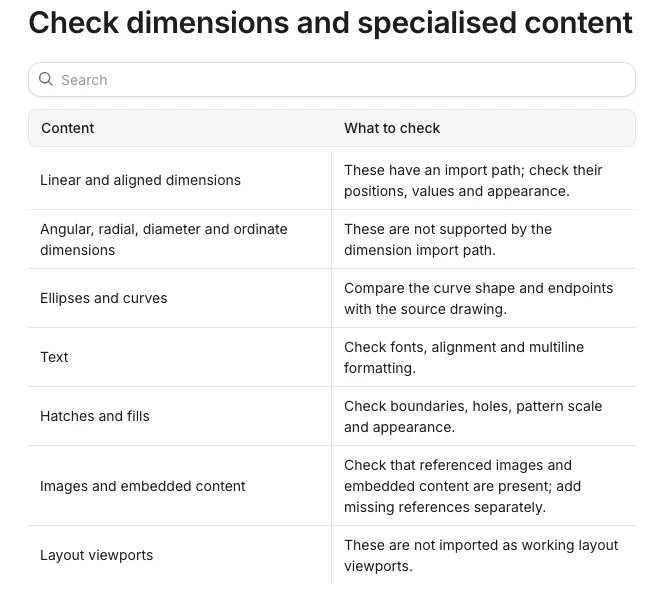
The docs list what to check before you hand a file over. Check units and a known dimension. Inspect curves, opening symbols, stairs and annotations. Check hatches and image-dependent content. Then confirm the recipient can open and use the output.
For a DWG source, the docs say to "export a DXF from the originating CAD application before importing it into Synaps". Advice: treat the import as a starting point. Check the imported drawing against the source yourself.
Import a DXF into Synaps and run the checklist above, then compare the result with your source drawing.
Frequently asked questions
Is DXF better than DWG?
Neither is better in every case. Choose by the recipient's software, as the Which file to send section explains.
Can I open a DWG without AutoCAD?
Yes, in some programs. The QCAD features page lists DWG read and write for QCAD Professional (QCAD features). Autodesk's help calls DWG native to AutoCAD-based products. The Open Design Alliance publishes its own DWG specification. Check that your program supports the version of your file. Synaps does not import DWG, per its documentation.
Does DXF keep layers and dimensions?
Autodesk says DXF can capture virtually all user-specified information, so check layers and dimensions after every export (see the checklist).
Which DXF version should I choose?
Choose the version the recipient reads. QCAD says many applications can only read certain older versions of DXF or DWG. Two QCAD pages give different versions: the FAQ says 2013 by default, and the features page lists R15 (2000) for the Community Edition. Check the version in your export dialog. No source we found names one best version, so ask the recipient.