Advice: choose among CAD file formats by the job the recipient has to do. To edit 2D drawings, ask for DWG, or DXF when the file moves between programs. To exchange a BIM model, ask for IFC. To review, print or keep a record, ask for PDF.
The split rests on vendor help pages, a US client standard and UK guidance. This guide covers seven CAD file types: DWG, DXF, DGN, RVT, IFC, PDF and SVG. For each one, you'll see what primary sources say and which to ask for by job.
Synaps publishes this article and makes browser-based drafting software. The Synaps software imports DXF, SVG, PDF and image files. Synaps exports PDF, DXF, PNG and JPEG. It does not import DWG. Its docs list no DWG export and no IFC, DGN or RVT support. This is research only, with no hands-on file testing by us. All sources were retrieved 4 October 2026.
Key takeaways
- Advice: name the format, release, units and a PDF reference copy in every file request.
- DWG, DGN and RVT are native to one vendor's software. Revit models do not open in earlier Revit releases once upgraded and saved.
- IFC is an open ISO standard for BIM exchange. Revit and Archicad export it through mapping files and translators. Graphisoft calls checking the result in an IFC viewer good practice.
- AutoCAD can import geometry from a PDF but does not convert raster images to vectors. Advice: treat the PDF as the reference copy.
- The US GSA requires DWG plus PDF sheets. UK BIM Framework guidance says exchanges should use open standards whenever possible.
CAD file formats at a glance
The table covers the seven CAD file types in this guide. Every cell comes from the sources linked in the sections below. Our advice on which to ask for sits in the section "Which format to ask for".
| Format | Native to or maintained by | What sources say it carries | Known limit, per source |
|---|---|---|---|
| DWG | AutoCAD-based products (Autodesk), proprietary per the ODA | Data stored as double-precision floating-point numbers (Autodesk) | Newer drawings are sometimes not backwards compatible with an earlier release (Autodesk) |
| DXF | Documented in AutoCAD LT help (Autodesk) | A binary or ASCII representation of a drawing file (Autodesk) | None in our sources |
| DGN | MicroStation, V8 DGN (Bentley) | Not described in our sources | None in our sources |
| RVT | Revit (Autodesk) | Revit models (Autodesk) | Not backwards-compatible: once upgraded and saved, a model won't open in an earlier release (Autodesk, Revit 2019 help) |
| IFC | Open international standard, ISO 16739-1:2024 (buildingSMART) | A standardised, digital description of the built environment (buildingSMART) | Content is up to users: they decide what to share via IFC (buildingSMART) |
| Not covered in our sources | Geometry, fills, raster images and TrueType text that AutoCAD can import (Autodesk) | No raster-to-vector conversion on import, and only single-precision data (Autodesk) | |
| SVG | W3C Recommendation for SVG 1.1 (W3C) | Not described in our sources | None in our sources |
Cells reading "Not described", "Not covered" or "None in our sources" mean our sources were silent. We did not open sample files in each program.
DWG and DXF: AutoCAD's format and its exchange partner
A DWG file is AutoCAD's own format. Autodesk calls DWG "the native drawing file format" of AutoCAD-based products (Autodesk, About Drawing (DWG) File Changes). The Open Design Alliance calls it the "native and proprietary file format for AutoCAD" (ODA, Open Design Specification for .dwg files).
DWG files also come in releases. Autodesk says drawings from the latest release are sometimes "not backwards compatible with an earlier release" (Autodesk, About Drawing (DWG) File Changes). The same page lists one format, the 2018 format, for "AutoCAD 2018-based through AutoCAD 2027-based programs".
A DXF file is the exchange partner. Autodesk describes it as "either a binary or an ASCII representation of a drawing file" (Autodesk, About Importing and Exporting DXF Files). The page adds that DXF is "often used to share drawing data between other CAD programs".
Advice: ask for DWG when you work in AutoCAD. Ask for DXF when you work in another program, or aren't sure what the sender uses. Our DWG vs DXF guide covers release tables and a pre-send checklist.
DGN and RVT: native formats from other programs
Two more native formats come from other tools: DGN from MicroStation and RVT from Revit.
DGN, MicroStation's format
Bentley's MicroStation help states: "The V8 DGN file format is MicroStation's native file format." (Bentley, The DGN and DWG File Formats). The same page adds: "MicroStation also opens and saves files in the AutoCAD DWG format."
AutoCAD covers the other direction. Its -DGNIMPORT command "imports data from DGN files" (Autodesk, -DGNIMPORT (Command)).
Our reading: a DGN file need not stop an AutoCAD-based team. Our sources don't say what each conversion keeps.
Advice: check the converted drawing against a PDF of the original.
RVT, Revit's model format
Autodesk's Revit 2019 help is direct: "Revit models are not backwards-compatible." After an upgrade and save, the model no longer opens in "an earlier release of the software" (Autodesk, About Opening Models that Require an Upgrade, Revit 2019 help).
For people outside Revit, Autodesk points to IFC. Revit's help suggests IFC for "an IFC-certified application that does not use the RVT file format" (Autodesk, Exporting to Industry Foundation Classes (IFC), Revit 2023 help).
Advice: ask for RVT only if your Revit release matches the sender's or is newer. Otherwise, ask for IFC and PDF sheets. For where 2D drafting sits next to BIM, see Between AutoCAD and BIM.
IFC: the open BIM exchange format
IFC stands for Industry Foundation Classes. buildingSMART International calls IFC "a standardized, digital description of the built environment" (buildingSMART, Industry Foundation Classes (IFC)).
The same buildingSMART page calls IFC "an open, international standard (ISO 16739-1:2024), meant to be vendor-neutral". The page also leaves the content to the sender. "It is up to users to decide what they want to share from their tools via IFC."

The export happens inside the BIM tool. Autodesk says "IFC provides an interoperability solution between different software applications." (Autodesk, Exporting to IFC). On export, "Revit automatically uses the appropriate IFC mapping file" (Autodesk, Load and Modify an IFC Mapping File).
Archicad works through translators. Graphisoft's Archicad 24 help sets out a translator's job. It "defines the rules for which elements should be converted and how they should be interpreted" (Graphisoft, IFC Translators: Overview). After export, Archicad 28 help says to "check the IFC model in an IFC viewer". Graphisoft calls this "good practice" (Graphisoft, Export IFC Model from Archicad).
Our reading: an IFC file holds what the sender's settings put into it.
Separately, UK guidance warns about information in general, not about IFC. UK BIM Framework Guidance Part B covers unstructured information. Such information "could result in additional costs, loss of information quality or degradation" (UK BIM Framework, Guidance Part B). Our sources do not show that IFC exchange always loses data.
Advice: in an IFC request, say what the model must contain. Open every IFC in a viewer on arrival. Graphisoft calls the same check good practice after export.
PDF: a record copy with import limits
AutoCAD can take content out of a PDF. Autodesk says: "You can import the geometry, fills, raster images, and TrueType text from a PDF file into the current drawing." (Autodesk, About Importing PDF Files).

The same page sets limits. PDF import "doesn't support raster-to-vector conversion". Precision differs too. DWG data is double precision, but PDF data is "only single precision". For text, the page names PDFSHXTEXT, which converts "SHX text into multiline text objects".
Our reading: a PDF is a record of the drawing, not the file you edit. A scanned PDF arrives in AutoCAD as an image, not as lines.
Advice: ask for PDF sheets alongside the working file, not instead of it. Check key dimensions against a native file where one exists. If a PDF is all you have, see our guide to PDF to DWG.
SVG and image files
SVG stands for Scalable Vector Graphics, a W3C specification. SVG 1.1 (Second Edition) carries the status "W3C Recommendation 16 August 2011" (W3C, SVG 1.1). SVG 2 still showed Candidate Recommendation status when we checked on 4 October 2026 (W3C, SVG 2).
Our reading: SVG is a graphics format first. None of our sources describe it as a CAD exchange format.
The UK guidance lists PNG and GIF among its examples of open formats (UK BIM Framework, Guidance Part B).
Advice: ask for DXF, not SVG, when you need an editable drawing. Treat PNG and JPEG as pictures to view or trace, not drawings to edit.
Which format to ask for
Advice: choose the format by the job. The list below builds on the sources above.
- To edit a 2D drawing in AutoCAD: DWG, saved to a release you can open.
- To edit in another CAD program or a browser tool: DXF.
- To work from MicroStation files: DGN, or a DWG saved from MicroStation.
- To share a BIM model across programs: IFC.
- To open a Revit model: RVT, only on a matching or newer Revit release.
- To review, print or keep a record copy: PDF sheets.
- For diagrams and vector graphics: SVG.
One client standard and one piece of national guidance show how this gets written down. They cover different countries.
US GSA: DWG plus PDF sheets
The US General Services Administration's PBS CAD Standards are dated 10 March 2021. The rule is explicit: "A/Es must submit CAD drawings in DWG file format." (GSA, PBS CAD Standards). Drawings "must comply with NCS Version 6". Our sources don't describe NCS beyond that line.
The standard also wants "One full-size set of the drawing sheets (as PDF files)". Our reading: the GSA wants both the working file and the printable sheets.
UK BIM Framework: open formats where possible
The UK BIM Framework's Guidance Part B, Edition 1, is dated September 2020 (UK BIM Framework, Guidance Part B). Its examples of "open formats" include PDF, IFC, PNG and GIF, among ten others.
The guidance defines open data as data "not restricted to specific software solutions". Proprietary data, by contrast, "is restricted to specific software solutions". The guidance also cites ISO 19650-1 clause 6.1. Exchanges "should be done using open standards whenever possible".
Our reading: the two differ. The GSA asks for DWG, which the ODA calls proprietary. The UK guidance prefers open standards. PDF appears in both.
Advice: follow the client's own standard for the editable file, and add PDF either way.
Advice: what to put in a file request
The checklist below is our advice, not a client standard.
- Format. Name it, and say what you'll do with it: edit, coordinate or review.
- Version or release. Give your AutoCAD release, your Revit release or the IFC version your tools read.
- Units. State the units you expect, such as millimetres or inches.
- PDF reference copy. Ask for PDF sheets with every editable file, so you can compare.
- Who checks. Name who opens the file on arrival and compares it with the PDF. For IFC, include a viewer check.
Search interest in CAD file types
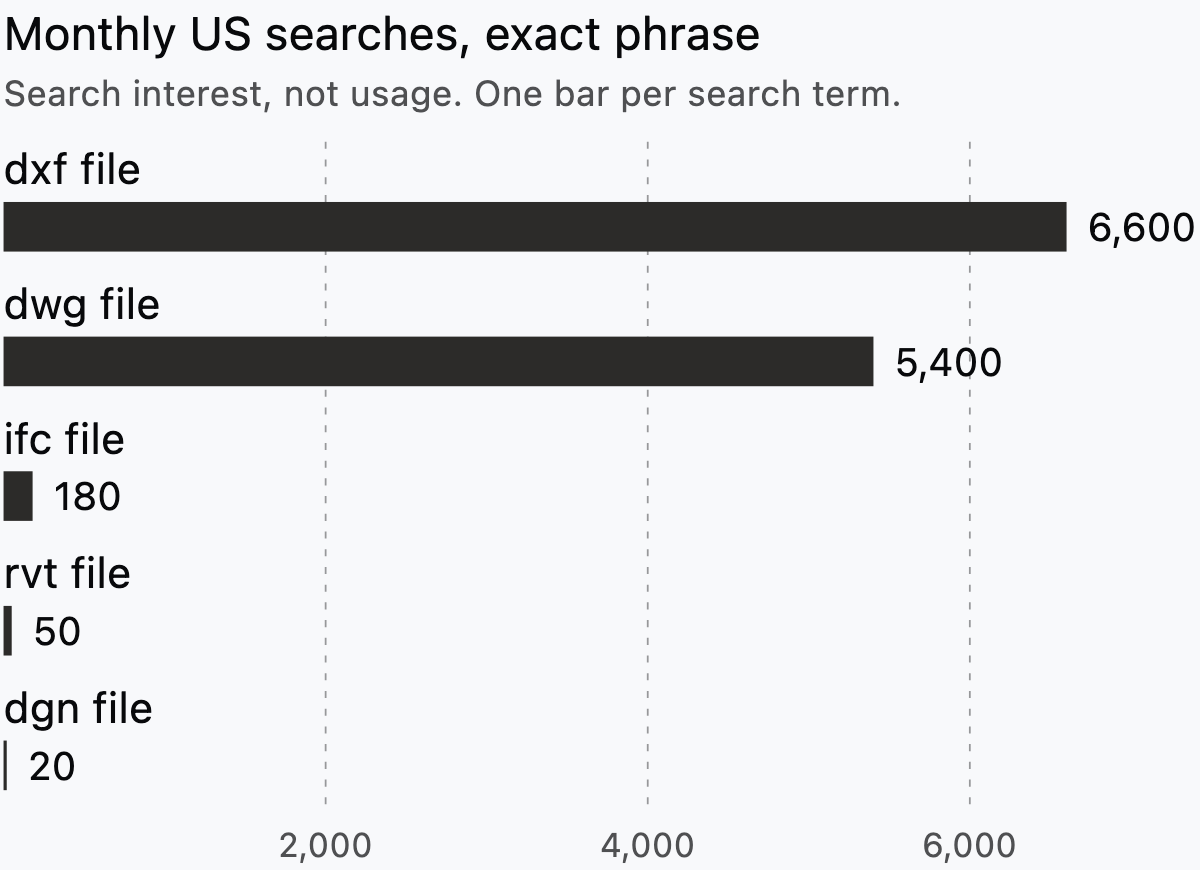
Search data shows what people look up, not what they use. SE Ranking reports 6,600 monthly US searches for "dxf file" and 5,400 for "dwg file". These are exact-phrase figures pulled on 4 October 2026.
A second tool, DataForSEO, groups close variants. The two tools agree on dxf and dwg. On ifc, rvt and dgn file, the tools differ by 5 to 44 times. The chart shows the lower SE Ranking exact-phrase figures.
How Synaps handles CAD file formats
The Synaps documentation, retrieved 4 October 2026, lists four import formats: Image, DXF, SVG and PDF (Synaps docs, import a drawing or image). The same page states that "DWG is not an option in the import menu". For a DWG source, the docs say to "export a DXF from the originating CAD application" (Synaps docs, DXF support).
A PDF import offers three choices. Image places "a picture of the PDF for reference or composition" (Synaps docs, import a drawing or image). Vectorize means "Extracting editable drawing content from a PDF that contains lines, text and fills". Trace means "Reconstructing a floor plan as architectural drawing elements". The docs add: "Image and PDF uploads have a displayed 50 MB limit." For scans, see scanned floor plan to editable drawing.
The DXF importer handles "lines, polylines, arcs, circles, text, fills and hatches" (Synaps docs, DXF support). Angular, radial, diameter and ordinate dimensions "are not supported by the dimension import path". Layout viewports "are not imported as working layout viewports".
Synaps exports each drawing paper as PDF, DXF, PNG or JPEG (Synaps docs, export your drawing). DXF, PNG and JPEG give one file per paper.
The DXF support page suggests PDF or image output "for a visual deliverable" (Synaps docs, DXF support). DXF fits "when the recipient needs drawing geometry".
Advice: for an IFC, DGN, RVT or DWG hand-off, keep your current CAD or BIM tool.
To test the DXF route, import a DXF into Synaps and compare the result with your source drawing.
Frequently asked questions
What is the most common CAD file format?
Our sources don't measure how many architects use each format, so we can't name one. The search interest section shows what people look up instead. For broader phrases, both tools report 480 monthly US searches for "cad file types". Search interest is not usage, though.
Is a PDF a CAD file?
AutoCAD can import parts of a PDF, but its PDF import "doesn't support raster-to-vector conversion" (Autodesk). The US GSA also asks for "100 percent final construction documents as PDF files" (GSA). The PDF section above covers the other limits.
Our reading: a PDF is a record copy, not a working CAD file.
Advice: keep the PDF as the reference copy and ask for an editable file too.
What is an IFC file?
IFC means Industry Foundation Classes, an open ISO standard for BIM exchange. The IFC section above covers how Revit and Archicad export it. One extra detail: buildingSMART says IFC's built environment includes "buildings and civil infrastructure" (buildingSMART).
Can I open a DWG without AutoCAD?
Some programs can. The DGN and RVT section notes that MicroStation opens and saves DWG files. The Open Design Alliance also publishes a DWG specification (ODA). Our sources don't say which programs use it.
Advice: check that your program reads your file's release. For Synaps, see the section on how Synaps handles CAD file formats.