Picture a sheet back from the contractor, a cloud round a door, and a revision letter nobody can match to an issue. The title block should have settled that: project, sheet title and number, date, revision and the names behind the sheet.
The cause is usually an office decision nobody wrote down: which fields the block carries, how revisions are lettered, which date changes on reissue. This guide sets those decisions out once, so the first sheet of the next job starts from a finished block.
Key takeaways
- ISO 7200 lists 19 title block fields across its three tables, 8 of them mandatory. Scale and projection sit outside the block.
- ISO 5457 puts the block in the bottom right corner of the drawing space, on landscape sheets from A0 to A3.
- Number sheets so a new sheet slots in without renumbering: a discipline letter, a type digit and a sequence with gaps.
- The original issue date never changes. Each reissue gets a new revision index and its own line in the revision block.
- Fix the field list, sheet sizes, numbering, revision scheme, date format and text heights once, then start every job from the same block.
What a title block must carry
ISO 7200:2004 lists 19 data fields for a title block in three groups, and 8 of them are mandatory. The count comes from its three tables, read here in the identical Indian adoption IS 11665:2009 (ISO 7200:2004, via IS 11665). The mandatory eight are legal owner, identification number, date of issue, sheet number, title, approval person, creator and document type.
The standard keeps the block short on purpose. Scale, the projection symbol and general tolerances sit outside the block and appear only where they are used.
The table gives the three ISO groups and what an architecture office writes in each field.
| Group | ISO 7200 fields | What the office writes |
|---|---|---|
| Identifying | Legal owner, identification number, date of issue, sheet number (all mandatory) | Practice name or logo, project and sheet number, first issue date then each reissue, the sheet identifier |
| Identifying | Revision index, number of sheets, language code (optional) | Issue letter or number, sheet count, language |
| Descriptive | Title (mandatory), supplementary title (optional) | Project name, then the sheet title |
| Administrative | Approval person, creator, document type (all mandatory) | Who checked, who drew or revised, drawing or schedule |
| Administrative | Department, technical reference, classification, status, page fields, paper size (optional) | Team, contact, keywords, issue status, sheet size |
US owner standards add minimum lists of their own. The General Services Administration's list, for example, runs from project title and number to plot scale and sheet size (GSA, PBS CAD Standards, 2021). Between them sit the submission stage, the firm names, seals, a key plan, a north arrow, a graphic scale and the revision dates.
The University of Houston asks for issue date, sheet number, sheet title, revision history, drawing phase and consultant details (University of Houston, CAD Standards, 2012). Each is an owner's rule for its own buildings, a checklist to cut down rather than a national requirement.
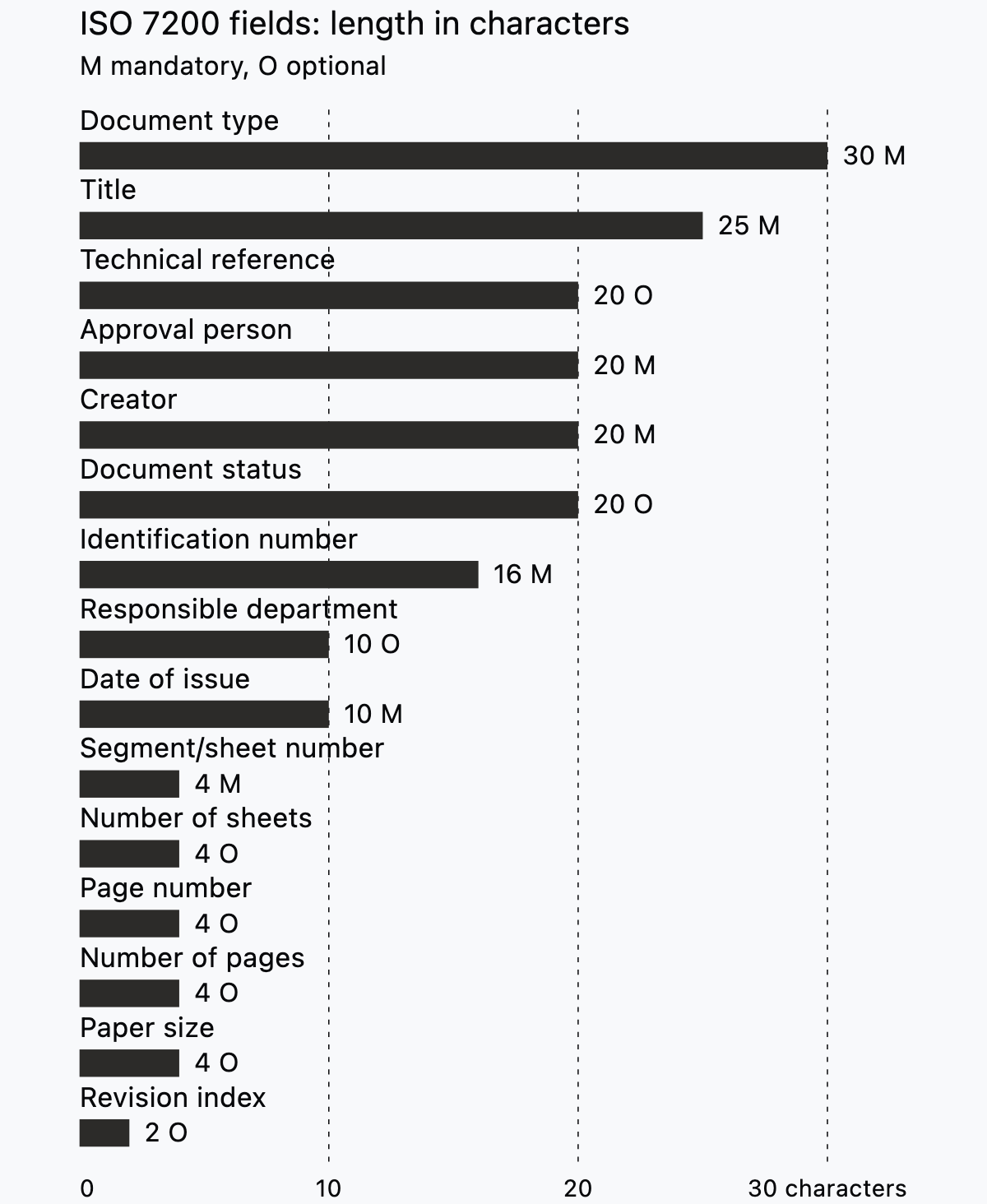
ISO 7200 also gives each field a length in characters. Size the cells from those lengths when you draw the block.
Where the title block sits and how big the sheet is
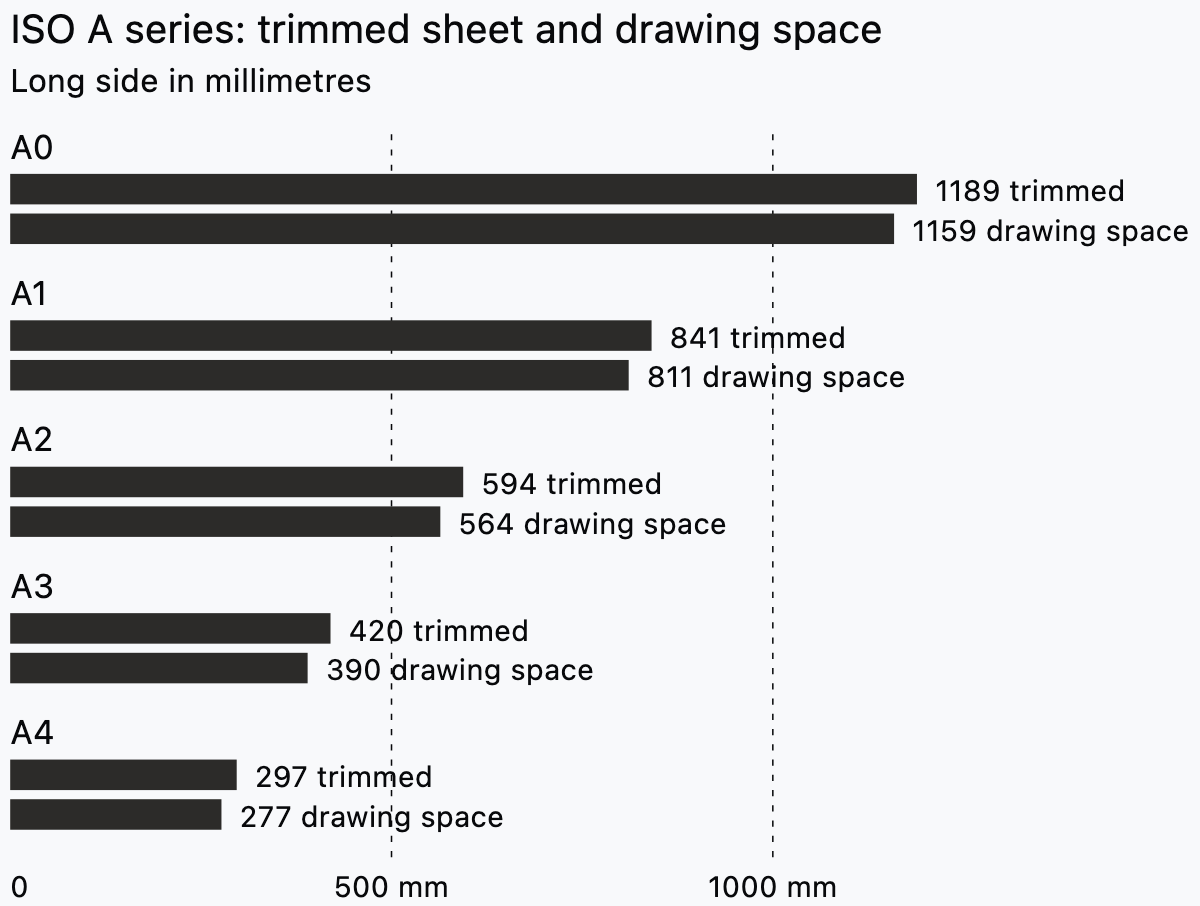
ISO 5457:1999 puts the title block in the bottom right corner of the drawing space, and A0 to A3 sheets are landscape only. A4 is the exception, with the block in the shorter, lower part of a portrait sheet (ISO 5457:1999, via IS 10711).
The border is 20 mm on the left, as a filing margin, and 10 mm on the other three sides. ISO 7200 fixes the block's total width at 180 mm, so it fits an A4 sheet between those margins (ISO 7200:2004). The same block then serves every sheet size.
ISO 5457 also asks for the smallest sheet that still reads clearly. In Synaps you press F for a paper and pick an ISO size from A0 to A6. Swap the orientation in the precise drafting tools.

US practice is the useful contrast. For example, the US Army Corps of Engineers' graphics standard requires a vertical title block in the right-hand margin (A/E/C Graphics Standard, Release 2.2, 2023). Its default sheet is ANSI D, with ISO A1 for international projects.
Those two rules disagree: a 180 mm block in the corner against a vertical block in the right margin. An office adopts one sheet system and keeps it.
Los Alamos National Laboratory draws on ARCH D, one size through a set (LANL CAD Standards Manual, 2021). ARCH D at 24 × 36 in and ANSI D at 22 × 34 in are different sheets, so name the one you mean.
Sheet numbers that survive a change to the set
A sheet number should still be right after a sheet is added or pulled, which rules out numbering the set 1 to n.
The US pattern joins a discipline letter, a sheet type digit and a sequence number, such as A-101. The Corps of Engineers' CAD standard lists eleven letters, among them A architectural, S structural, M mechanical and E electrical (A/E/C CAD Standard, 2015). The type digit runs 0 general, 1 plans, 2 elevations, 3 sections, 4 large scale views and 5 details.
Sequence numbers need not be consecutive, so leave gaps for sheets that arrive during design. A sheet that must sit between two others takes a suffix, A104A and A104B in the CAD standard's example. The Corps' graphics standard dropped "sheet X of Y" from the block because the index already carries the order (A/E/C Graphics Standard, 2023).
The UK pattern comes from the national annex to BS EN ISO 19650-2. A container ID runs project, originator, volume, level, type, role and number, hyphen delimited, as in 123456-ORG-A1-ZZ-MO-A-0001 (CDBB, National Annex guidance, 2021). Project and originator codes take 2 to 6 characters. Volume, level and type take 2, the role 1 to 2 and the number 4 to 6.
A studio picks the pattern its consultants already read and writes the chosen letters and digits into the office standard. After that the scheme stays fixed across jobs.
Revisions, status and dates
ISO 7200 allows a revision index of letters A to Z, then AA and AB, or figures 1, 2, 3 (ISO 7200:2004). Avoid I and O, which read as 1 and 0. The date of issue alone may stand in for the index.
Under ISO 7200 the date of issue is the day of the first official release, and of each released version after it. Virginia Tech's standard is blunt: the original issue date should not change once the drawing has been issued (Virginia Tech, CAD Standards, 2008). Read together, that means two dates in the block: the original issue, which never moves, and the current issue, which does.
The same UK annex uses P01, P02 for preliminary revisions and C01, C02 for contractual ones (CDBB, National Annex guidance, 2021).
A status code says what the container may be used for. The UK BIM Framework guidance gives the codes (UK BIM Framework, Guidance Part 2, 2020). S0 is initial status, S1 suitable for coordination, S2 for information, S3 for review and comment, S4 for stage approval. A1 to An mark authorised and accepted, and CR the as constructed record. An S3 container should not be used for contractual purposes, such as procuring materials or constructing the works.
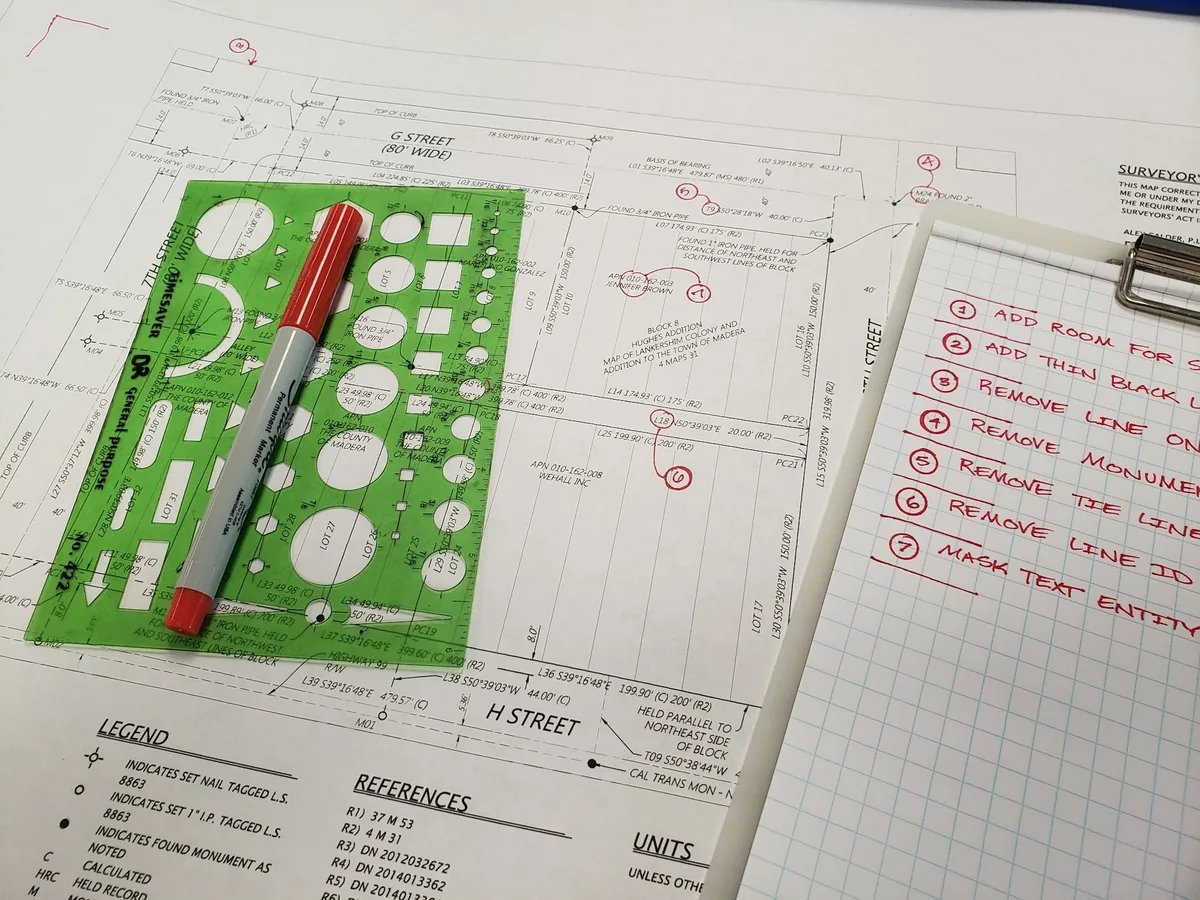
On the sheet, the Corps of Engineers' graphics standard flags each revision with an equilateral triangle marker (A/E/C Graphics Standard, Release 2.2, 2023). The change itself sits inside a revision cloud drawn at 0.35 mm. Its revision block has three columns, mark, description and date, with the date written MMM YYYY. The first entry goes on the lowest line.
Los Alamos puts a "not for construction" mark on every in-progress sheet, left of the title block at 45 degrees (LANL CAD Standards Manual, 2021).
Scale, north arrow and the sheet grid
Put a graphic scale on every scaled drawing, so a print reduced to A3 still reads. The Corps of Engineers' graphics standard asks for at least one graphic scale per scale used on the sheet (A/E/C Graphics Standard, 2023).
Los Alamos draws all principal plans in a set at one scale, with a graphic scale on each (LANL CAD Standards Manual, 2021). Choosing the scale itself is covered in the guide to architectural drawing scales.
Plan north points up or to the left under the Corps' standard, and true north keeps one orientation through the set. Los Alamos keeps the north arrow in paper space where possible.
A sheet grid lets a note or a revision be located by reference. ISO 5457 divides the sheet into 50 mm fields, letters top down and numbers left to right, without I or O (ISO 5457:1999). The Corps' grid runs on 1.5 in modules, letters from the bottom up, and also leaves out I and O.
In Synaps you place the grid letters and the scale note as text with T.
Seal, signature and who signs
Some jurisdictions require a seal, a signature and a date on every sheet. Texas is one example. The board's rules say an architect may not issue a regulated drawing unless it is sealed, signed and dated (Texas Board of Architectural Examiners, 2021). The alternative is a marking that the drawing is not for regulatory approval or permitting.
The Texas rule puts the seal, signature and date on each sheet of drawings and on the index sheet, legible on every copy. An electronic seal is allowed on the same condition. The seal is at least 1.5 in across, and the sealing architect keeps the sealed original or a copy for ten years.
In the UK the regulation attaches to the person. The title architect is protected by law under the Architects Act 1997 (ARB, the title architect). Check the rule with your own board or council before the first issue, since this guide is not legal advice.
Set it up once: the office standard
Write the office standard as a one-page list that fixes six things. They are the field list, the sheet sizes, the number scheme, the revision scheme, the date format and the text heights. For the heights, GSA sets a floor of 1/8 in for plotted text (GSA, PBS CAD Standards, 2021). ISO 5457 sets its grid letters at 3,5 mm. Write your own minimum and the block's field heights into the list.
Keep one block per sheet and lock it. The University of Houston's standard, for example, requires one title block per file, in paper space (University of Houston, CAD Standards, 2012).
Montana State University also keeps its border in paper space, and the architect adds only a logo and stamp (Montana State, CAD Standard, 2016).
Make the first sheet of every job from the same template, never from the last job's sheet. Los Alamos insists on a consistent title block through the set and a standard template (LANL CAD Standards Manual, 2021). Its field definitions also name a checker who is not the person who drew the sheet. All sheets of one issue carry the same date.
In Synaps you turn the finished lines and text into a reusable block with Cmd/Ctrl+B and place it on every paper.

Title blocks in Synaps
Synaps publishes this article. The job is to draw the sheet, block and fields once, reuse them on every paper and export the set as PDF or DXF.
- Press F for a paper and pick an ISO size from A0 to A6, or a custom size. Use Swap width/height for the orientation and set the sheet scale, such as 1:50 or 1:100.
- Draw the outline and the cells as rectangles typed to size: press R, then enter the width in W and the height in H. Add lines for the remaining divisions.
- Place each field label and value as text with T, then set the font, size and alignment.
- Select the lines and text and press Cmd/Ctrl+B to make a block. Duplicate it onto each paper. Double-click the block to change a shared field, such as the project name, on every sheet at once. Moving one instance moves only that instance, so each paper keeps its own placement.
- Keep the per-sheet fields (sheet title, number and revision row) as plain text on each paper, over the block. Shared contents update on every instance, and those fields differ per sheet.
- Rename the block to Title block in the Layers panel and lock it, which holds it in place while you draft.
- To issue, select every paper header while holding Shift and export one combined PDF. DXF, PNG and JPEG export one file per paper.
A studio with its block already drawn as DXF or SVG imports the file and makes the block from the imported lines and text. Which format each consultant needs is covered in the guide to CAD file formats for issuing drawings.
Frequently asked questions
Does the title block go on A4 sheets too?
Yes. A4 is the one portrait sheet under ISO 5457, with the block across its lower part. Draw the block for A4 first and the larger sheets take it unchanged.
What goes in the title block of a sketch?
Enough to file it. Los Alamos accepts an improvised block on a sketch (LANL CAD Standards Manual, 2021). It must give the project number, drawing number, project title, sheet title, sheet number where one applies, and the author's name, signature and date.