Yes, AI can make a floor plan. An AI floor plan generator turns a written brief into a starting layout, which you measure and correct before it carries any decision.
Take a client brief for a two-bedroom flat that lands on a Friday afternoon. You type it in, and a layout appears with labelled rooms, beds and doors. It looks resolved until you measure the second bedroom and find it 2.40 m wide, short of what a double bedroom needs, even though a bed is drawn inside it.
That gap between looking finished and being right is what this guide covers: the three kinds of output, a brief you can check against, and a 10-point check.
Key takeaways
- An AI floor plan generator gives you one of three things: a picture of a plan, linework to trace over, or an editable plan with walls, rooms and openings. The type decides how much checking work follows.
- Write the brief as fixed conditions first and preferences second, with the footprint and key dimensions in numbers. A brief with numbers is a brief you can check against.
- Measure before you develop. A room label and a furniture symbol do not prove that a room meets the brief or the standard that applies.
- Fix local problems by editing walls and openings. For a major miss, revise the brief and name the missing requirement first.
- Structure, escape and compliance stay with you, whatever the tool produced.
What an AI floor plan generator gives you
An AI floor plan generator gives you one of three outputs, and the type decides how much work follows. Check which one you have before you judge the layout.
| Output | What you can do with it | Work that follows |
|---|---|---|
| Picture of a plan | Discuss the arrangement | Redraw everything you keep |
| Linework to trace over | Use it as an underlay at a known scale | Rebuild walls, openings and rooms on top |
| Editable plan | Measure, select and change walls, rooms and openings | Check and correct in the same drawing |
A picture of a plan is the first type. The image looks like a drawing but holds no geometry. You can't select a wall, measure a room reliably or move a door. Treat it as a sketch for discussion, and expect to redraw everything you keep.
Linework you can trace over is the second type. The lines may sit at a usable scale, but nothing marks which lines are walls and which are furniture. You still rebuild the walls, openings and rooms on top.
An editable plan is the third type. Walls, rooms and openings exist as drawing elements, so you can measure, select and change them. You check and correct in the same drawing you go on to develop. In Synaps, floor plan generation places one editable plan on the canvas, with recognised walls, rooms and openings you can adjust.
Whatever the type, research shows where generative layouts are weak. The 2020 House-GAN paper simplified the task: no room sizes, only rectangular rooms, and adjacency without doors (Nauata et al., House-GAN, ECCV 2020). The same paper lists "inaccessible rooms (e.g., room entry is blocked by closets)" among its failure modes. The follow-up paper notes that "small doors need to be placed precisely at the room boundaries" (Nauata et al., House-GAN++, CVPR 2021).
These are research models, not the tools you'll use in practice. They still show where a generated layout can go wrong: room sizes, access and doors.
Looks can mislead too. In a House-GAN++ user study, professional architects compared generated plans with real ones. They rated the generated plan better 25% of the time, called it a tie 32% of the time and preferred the real plan 43% of the time. A plausible plan is hard to tell from a sound one at a glance, so the check below relies on measuring.
Write a brief the result can be checked against
A good brief does two jobs. It tells the generator what to produce, and it gives you a list to check the result against.
Split the brief into fixed conditions and preferences. Fixed conditions are things the plan cannot break: the footprint, the entrance, the number of bedrooms, a stair or riser you must keep. Preferences are things you would trade, such as an open kitchen or a south-facing living room.
Put the most important requirement first. If the second bedroom must take a double bed, say so at the top, not at the end of a long paragraph. Then state the footprint and key dimensions in numbers. "A generous living room" gives you nothing to measure. "Living room at least 4 m wide" does.
Here is a short brief for the Friday flat:
- Fixed: single-storey flat, internal footprint 9.0 m by 8.0 m, entrance on the north wall.
- Fixed: two double bedrooms, one bathroom, kitchen and living space.
- Fixed: every bedroom opens off the hall.
- Preference: open kitchen and living area facing south.
- Preference: a storage cupboard off the hall.
In Synaps, a closed rectangle or polyline larger than 20 m² constrains the plan to your footprint, and you check the fit afterwards. The guide to generating a floor plan within a boundary covers the steps. Moving the boundary afterwards does not reshape the plan, so set it right first.
The 10-point check for any generated floor plan
Run these ten checks in order on any generated plan before you develop it. The figures are examples from England and the US, so use the standard that applies to your project.
1. Footprint and boundary fit
Overlay the footprint from the brief and check that every external wall sits on it or inside it. Compare the overall dimensions with the numbers you gave. Look closely at recesses, corners and irregular edges, where the fit is most likely to slip.
2. Room sizes and widths
Measure each room's area and its narrowest width, then compare both with the brief and the standard. In Synaps, use Measure to check each room's dimensions against the brief and the minimums before you change anything.
England's Nationally Described Space Standard (NDSS) applies where the local planning authority has adopted it. A single bedroom needs at least 7.5 m² and a width of at least 2.15 m. A double or twin bedroom needs at least 11.5 m². One double must be at least 2.75 m wide, and every other double at least 2.55 m.
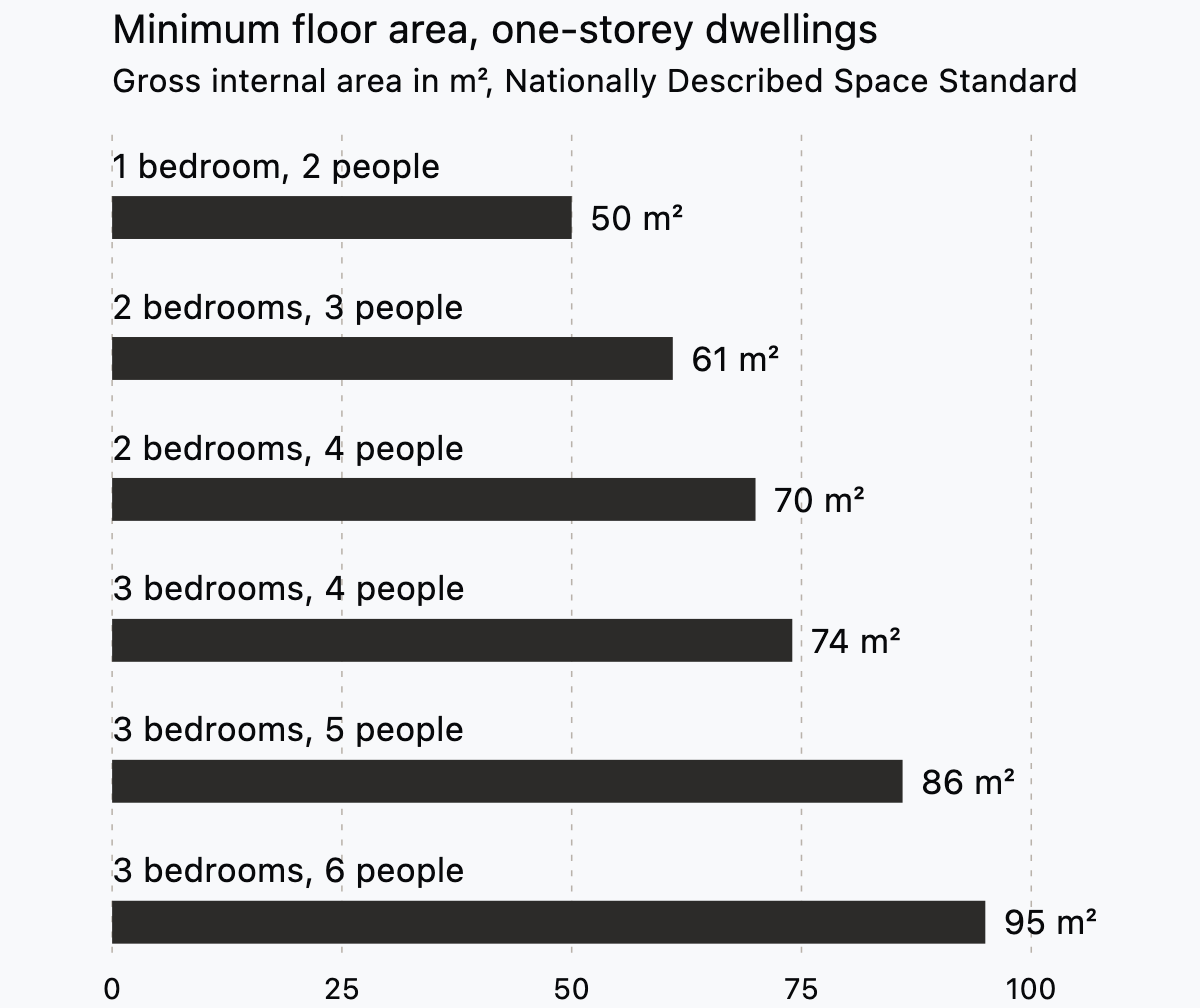
Check the whole dwelling as well. The NDSS sets a minimum gross internal area for each dwelling type, shown below for one-storey homes.
For a US example, the City of Minneapolis publishes an attic-bedroom guide that cites the 2015 Minnesota Residential Code (Minneapolis Construction Code Services). Habitable rooms need at least 70 sq ft (6.5 m²) and at least 7 ft (2134 mm) in any horizontal dimension.
3. Circulation and access
Trace the route from the entrance to every room. No room should be reachable only through a bedroom or a bathroom. Check that a wardrobe, a kitchen run or a door swing doesn't block the entrance. Then walk the hall with the furniture that has to pass through it.
4. Doors
Confirm that every room has a door, set in a wall where a person can actually reach it. Draw each swing and check that it clears furniture, fittings and neighbouring doors. Two doors that collide in a small lobby are cheap to fix now and costly to fix after technical design.
5. Windows and escape
Check that each habitable room has a window, and that bedrooms have an escape opening where the code requires one. The Minneapolis guide sets a net clear opening of at least 5.7 sq ft. The opening must be at least 24 in high and 20 in wide. The sill can be no higher than 44 in. In England, check escape against Approved Document B instead.
The guide also warns that "these two minimums do not equal the 5.7 square feet". A window at exactly 24 in by 20 in gives about 3.3 sq ft, so check height, width and area separately.
6. Wet rooms and services
Look at where the bathroom, en suite and kitchen sit. Grouping them around shared walls keeps drainage runs short and lets one riser serve several rooms. In a block of flats, wet rooms usually need to stack over the ones below, so check the plan against the floors around it.
7. Structure
A generated layout puts walls where rooms meet, not where loads go. Spans, bearing walls and load paths are yours to set. Check that long clear spans are intentional, and that walls you expect to carry load line up between floors.
8. Storage
Count built-in storage, not leftover corners. The NDSS asks for 1.5 m² in a one-bedroom, two-person home, 2.0 m² with two bedrooms and 2.5 m² with three. A cupboard drawn in the hall often looks generous until you measure its internal depth.
9. Ceiling and headroom
A plan doesn't show heights, so add them to the brief when they matter. That means rooms under a roof, in a basement or inside an existing building. The NDSS sets a floor-to-ceiling height of 2.3 m for at least 75% of the gross internal area. The Minneapolis guide sets 7 ft for habitable spaces, including hallways and bathrooms.
10. Labels against reality
A room label and a bed symbol are not a check. The NDSS is plain about this: "Furnished layouts are not required to demonstrate compliance." Furniture on a generated plan shows one arrangement at whatever size the generator chose. Measure the room itself, then test your own furniture against it.
Run this on the Friday flat. The footprint of 9.0 m by 8.0 m gives 72 m², which clears the NDSS minimum of 70 m² for a two-bedroom, four-person flat by 2 m². Both bedrooms are doubles, so each needs at least 11.5 m². One must be at least 2.75 m wide and the other at least 2.55 m. A second bedroom drawn 2.40 m wide fails, even when the bed symbol fits inside it.
Fix it or generate again
Sort what you found into local problems and major misses. A local problem sits in one place: a door on the wrong wall, a bedroom 200 mm too narrow, a cupboard where the hall should be. A major miss breaks the brief: a missing bedroom, the wrong entrance or a plan that ignores the footprint.
Fix local problems in the drawing. Move the wall, swap the door or resize the room, then measure again what changed. In Synaps, you edit the recognised walls and openings directly with the drawing tools.
For a major miss, revise the brief rather than patching the result. Name the missing requirement first and leave the rest as it was, so you can see what the change did. A new submission can use another credit, so fix locally where the layout is mostly sound.
Generation is the wrong tool when the plan already exists. To redraw a scanned or PDF survey drawing or a client's old plan, trace it instead. The guide to turning a scanned floor plan into an editable drawing covers that route.
Where architects stand on AI
Adoption is rising, and one worry bears directly on this article: who judges the output. The RIBA AI Report 2025 found that UK practices using AI rose from 41% in 2024 to 59% in 2025. In the same survey, 65% expect AI to have an increasingly positive effect on productivity in construction. Yet 44% are concerned it will let people without sufficient professional knowledge design buildings.

US figures measure something different, so read them separately. In March 2025, Dezeen reported an AIA study of over 500 AIA-registered architects (Dezeen). Only 6% regularly use AI tools in their practice. Nearly all, 90%, expressed concerns, with inaccuracy among the top-line ones.
Read together, the figures point to the same responsibility. Inaccurate output does the most harm when nobody qualified checks it, and that check is professional work. For the wider field of tools, see AI tools for architects.
Generating a floor plan in Synaps
Synaps publishes this article and makes browser-based drafting software with AI floor plan generation. The job is to turn a written brief into one editable starting plan that you check and develop.
- Optionally, draw a closed boundary larger than 20 m² to constrain the footprint.
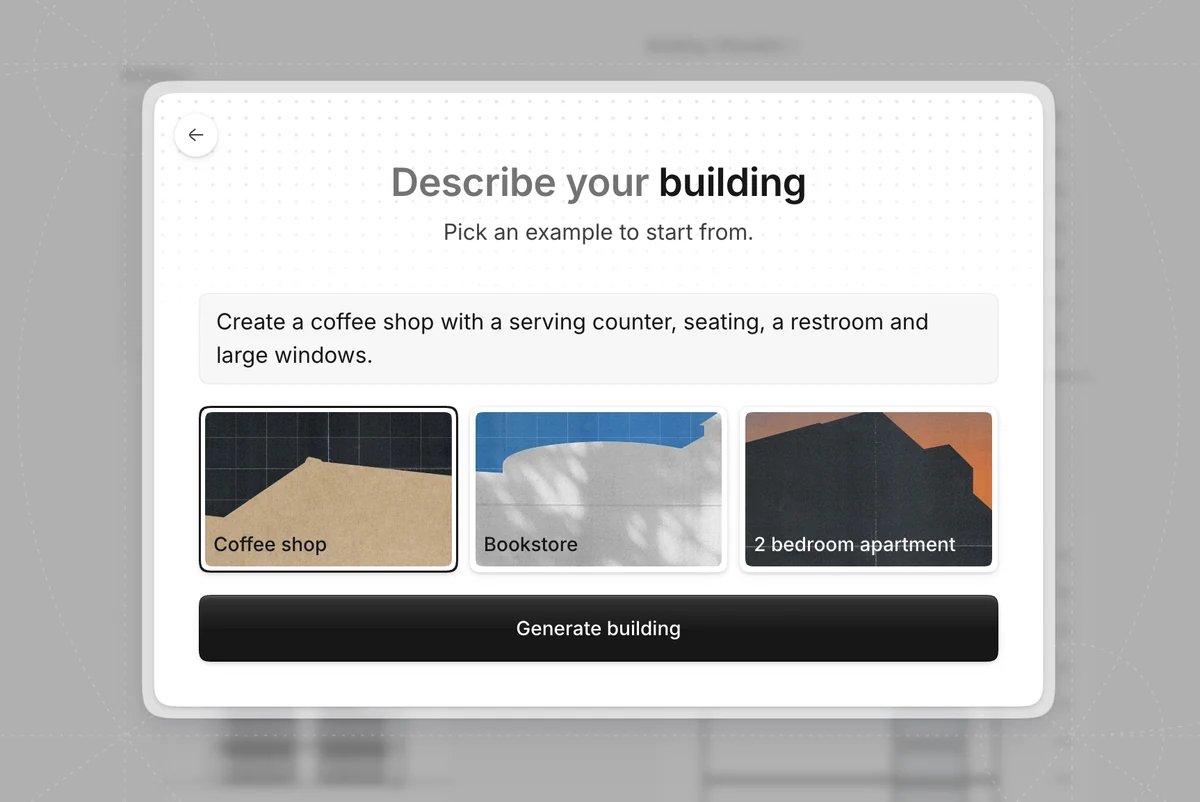
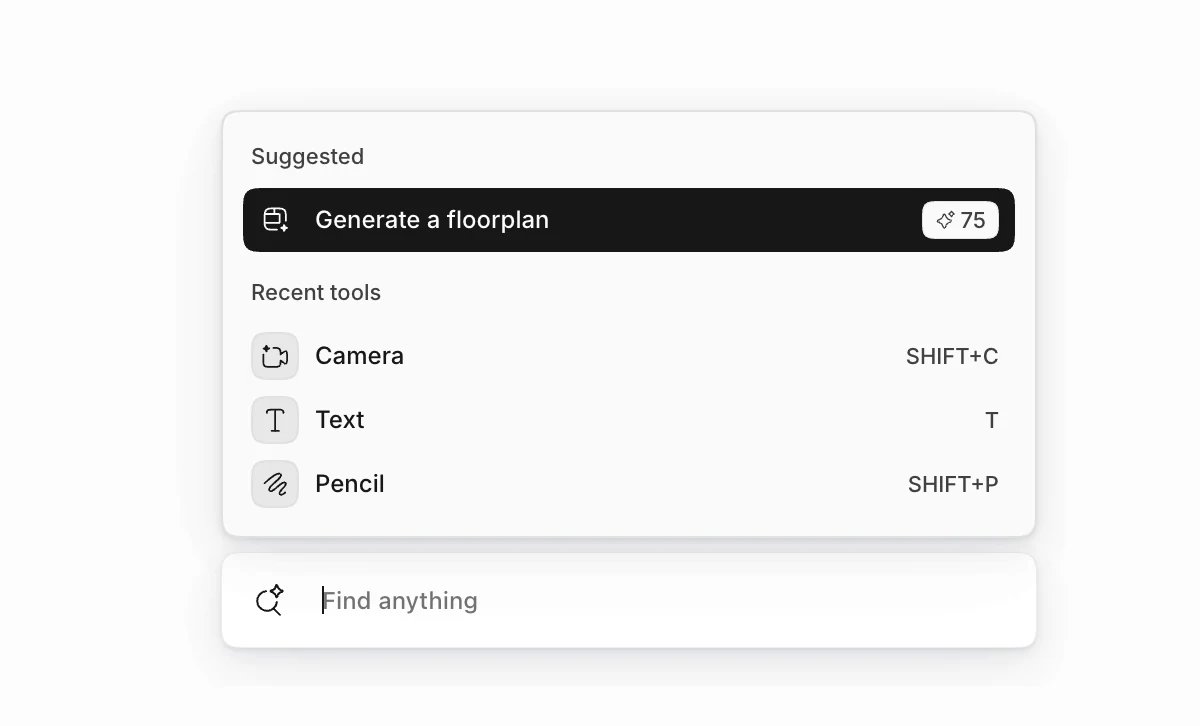
- Open command search with Cmd/Ctrl+K, search for Generate a floorplan and choose it.
- Describe the space, the rooms and the key relationships, with the most important requirement first.
- Check the result against the 10 points above, using Measure for dimensions.
- Edit the walls, rooms and openings with the drawing tools.
Each submission produces one plan. The generator does not size structure or validate the plan against regulations, so check it before delivery. The generate a floor plan docs cover each step in more detail.
Frequently asked questions
Can ChatGPT make a floor plan?
Not as an editable plan. A general chatbot can describe a layout, draw a picture of one, or write code for simple linework. None of these gives you walls, rooms and openings as drawing elements. Treat the result as the first or second output type above. Use a chatbot to talk through options, then draw or generate the plan you intend to develop.
Is an AI-generated floor plan code compliant?
No tool output is compliant on its own. Compliance depends on location, building use and the rules that apply, and a qualified person has to confirm it. Standards also differ in kind. In England, the NDSS is a planning standard that councils choose to adopt, separate from the building regulations.
Does an AI floor plan generator replace an architect?
Few architects expect that. In the RIBA AI Report 2025, just 4% thought human creativity would no longer be needed for building design because of AI. A generator gives you a layout to react to. Deciding what the building should be, and answering for it, stays with you.
How detailed should the brief be?
Include everything you would reject a layout over. Room list, footprint, entrance and minimum dimensions matter more than adjectives. If a requirement isn't in the brief, you can't fairly fail the plan for missing it.
Related reading
- AI tools for architects
- Generate a floor plan within a boundary
- Scanned floor plan to editable drawing
Generate a starting layout from your next brief in Synaps, then run the check above.